

yourorg.orgo.space. A custom domain moves it to an address you own, such as members.yourorg.org. The same setup also requests the TLS certificate and prepares your domain as an email sender, so you do this once rather than three times.
Built for organizations whose members should never see a vendor address, including federations, associations, and unions with an established public domain.
Replaces running a redirect or a reverse proxy of your own in front of the members’ area.
Settings → Customization → Custom Domain
Requires ADMIN_TENANT. Every endpoint behind this page enforces it server side, not just the menu.
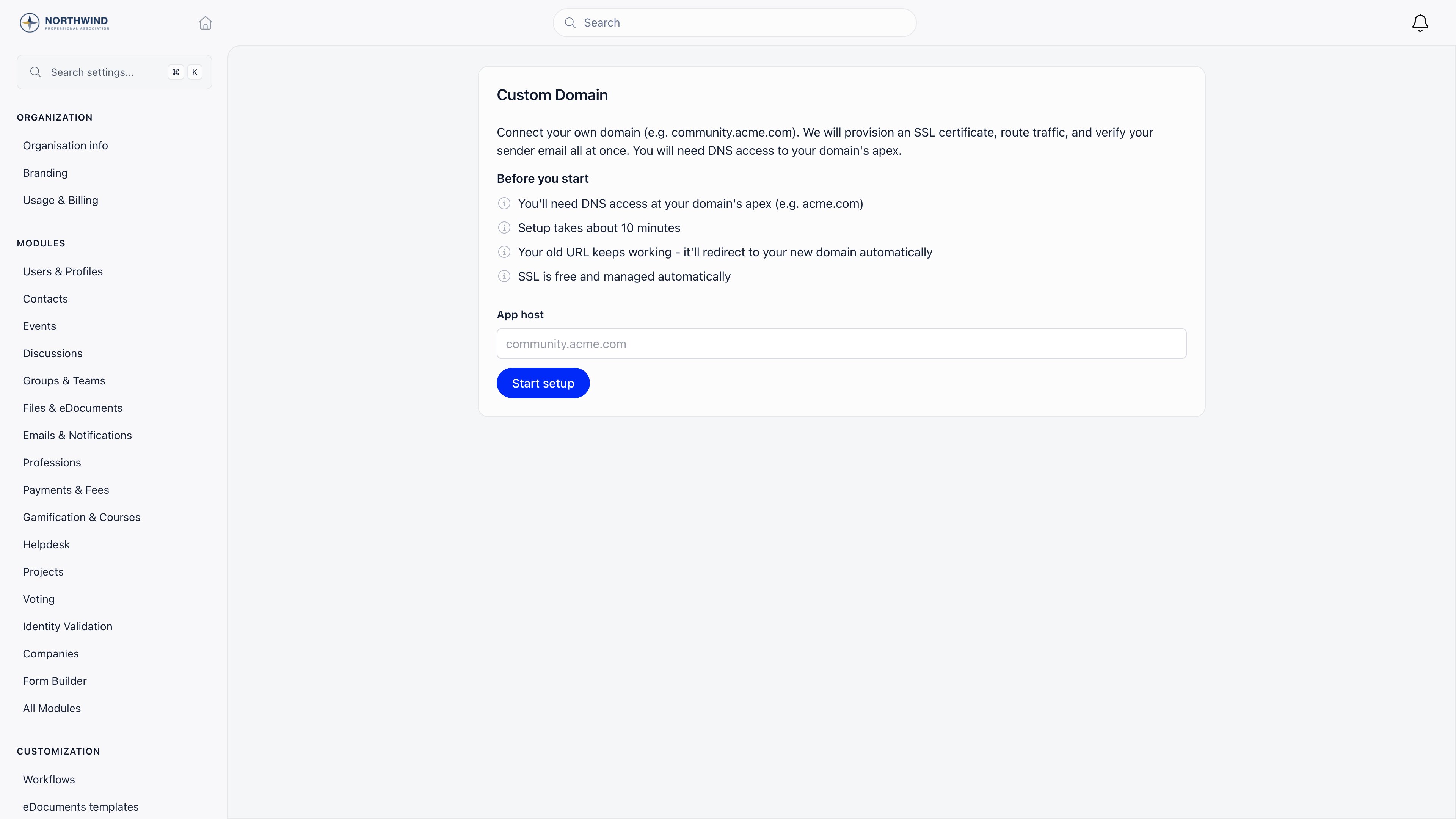
Before you start
The page states four things up front, and all four matter:- You need DNS access at your domain’s apex (for example
acme.com), not just at the subdomain. - Setup takes about 10 minutes of your time. Validation afterwards is not instant.
- Your old URL keeps working: once the new domain goes live,
yourorg.orgo.spaceredirects to it automatically. - TLS is free and renewed for you.
members.acme.com is accepted, acme.com is rejected, and Orgo resolves the registrable apex using the public suffix list, so community.acme.co.uk correctly resolves to acme.co.uk. One setup at a time: cancel a running setup before starting another.
The setup sequence
1
Enter the host and start
Type the address, for example
community.acme.com; the page previews the final URL. Start setup immediately requests a wildcard TLS certificate for *.<your apex>, creates a sender identity for the same apex, and points that identity’s bounce address at bounce.<your apex>.2
Add the DNS records
Once both requests come back, the status becomes Awaiting DNS and two record groups appear. Add every record exactly as shown at your DNS provider. Use Copy all as text or Download as CSV rather than retyping.
3
Wait for detection
Orgo checks for the records on its own. The page refreshes every 10 seconds while setup is running, and Check now forces an immediate check.
4
Live
When the certificate is issued and your CNAME actually resolves to the Orgo target, the domain starts serving and the old address begins redirecting.
The two record groups
Domain Validation
Proves you own the domain so the certificate can be issued, and points traffic at Orgo.Email Setup
Authorises Orgo to send mail signed as your domain, and makes that mail authenticate as yours rather than as Amazon’s.
Five required records, so the verified counter next to Email Setup now counts to 5. It can read 5/5 while the DMARC row still shows as Recommended, because recommended records are not counted.
<region> is the AWS region your sender identity lives in, today eu-central-1. Copy every name and value from the page rather than from this table: the DKIM tokens are unique to your domain, and the region is stored per setup so it cannot change under you.
Three things to check against the form your provider gives you:
- The zone. All of these belong in your apex zone. A provider that asks for a host name relative to the zone wants
bounce, notbounce.acme.com. - The MX priority. The leading
10in the MX value is the priority. If your provider has a separate priority field, put10there and onlyfeedback-smtp.<region>.amazonses.comin the value. - The quotes. Orgo shows TXT values wrapped in double quotes, which is how they look in a zone file. Most provider forms want the value without the surrounding quotes; the few that take raw zone-file syntax want them. Match how the TXT records already in your zone are stored.
What the bounce records do
Every email carries two sender addresses: theFrom: header your recipients read, and the envelope sender (the Return-Path) that only the receiving server sees. Without these two records, the envelope sender on Orgo’s mail for you sits on a subdomain of amazonses.com.
That matters because SPF is checked against the envelope domain. SPF passes, but it passes for Amazon’s domain rather than yours, so it is not aligned with your From: header, and DMARC only counts a check that passes and aligns. Your DMARC result then rests entirely on DKIM, and filters that score the From: domain’s SPF on their own mark the message down.
The MX record moves the envelope onto bounce.<apex>, a subdomain of your own domain, and the TXT record on that subdomain authorises Amazon SES to send for it. SPF then both passes and aligns, so DMARC has two independent passing checks instead of one.
What it does not do:
- It does not change the address recipients see. That is the contact email verification described under Going live.
- It does not replace DKIM. Both stay required, and DKIM is still what carries alignment if a message is forwarded.
- It does not change the SPF record on your apex, and does not need to. For Orgo’s mail, the SPF record receivers consult is the one on
bounce.<apex>. - It relies on DMARC’s default relaxed alignment, under which
bounce.acme.comcounts as aligned withacme.com. If your DMARC record asks for strict SPF alignment withaspf=s, a subdomain does not align and DKIM remains your only aligned check. - It does not improve a domain’s existing reputation, and it does not gate anything in this setup. Status, going live, and sender verification all ignore it.
If the MX record is missing, wrong, or removed later, Amazon SES silently falls back to its own envelope domain and your mail keeps flowing exactly as it did before. That fallback is deliberate: a DNS typo here costs you alignment, never delivery.
Your existing SPF record
Below the records table you may see a panel titled Optional: your existing SPF record. It is advice about the SPF record on your apex, and it is deliberately not a copy-paste row in the table above. It appears in one of two forms:- A merged value. Orgo reads the SPF record currently published on your apex and offers the same record with
include:amazonses.cominserted before the trailingall, keeping every sender you already authorise. If your apex has no SPF record at all, the suggestion is a barev=spf1 include:amazonses.com ~all. - A warning with no value, when your record is already close to SPF’s ceiling of 10 DNS lookups. One more lookup could cross it, which fails SPF for your whole domain, so the fix is to consolidate the record first rather than add to it.
bounce.<apex>. It exists for the filters that also glance at the apex.
Records on a domain that was already verified
Orgo never repoints a sender identity that already has a bounce domain of its own. If your domain was configured by hand before this existed, that bounce domain is kept and the wizard shows its records rather thanbounce.<apex>.
Otherwise, the next automatic check adds the bounce configuration to your existing setup. Two new rows appear in Email Setup marked Pending and the counter that used to read 3/3 now reads 3/5. Nothing else changes: your domain stays Active, mail keeps sending, and DKIM keeps signing. Publish the two records when it suits you and the badge flips on the next check.
Status reference
Awaiting DNS is the only status that needs you.
The 7-day limit. A setup that sits in Awaiting DNS or Validating for 7 days is cleaned up: the certificate and the sender identity are released and the setup record is deleted. There is no warning status for this. The page simply returns to the empty Start setup form, and you begin again from scratch.
How often Orgo re-checks. Checks start once a minute and slow down the longer a setup waits: roughly every minute for the first half hour, then every five minutes for about six hours, then every half hour for about a day, then once a day until the 7-day cleanup. Check now bypasses that schedule, so use it after you have just saved your records rather than waiting for the next automatic pass.
Going live, and what changes
Two things have to finish, and they rarely finish together. Traffic. The certificate must be issued and your host’s CNAME must actually resolve to the Orgo target. Only then does Orgo switch your app host over and set up the redirect fromyourorg.orgo.space.
Email. Both the domain verification and all three DKIM keys must succeed. When they do, and your organization’s contact email is on the same domain (or a subdomain of it), Orgo marks that address as a verified sender. Until then, mail goes out from no-reply@orgo.space with your contact email as the reply address; after verification, from your contact email. The two bounce records are not part of this gate: a domain reaches Active with them still Pending, and they can be published afterwards.
The status reads Active only once both halves are done, so a domain can be serving pages perfectly while the page still says Validating because DKIM has not propagated yet.
Payment and donation short links (/pay/<slug>) use a separate payment host this setup does not change; ask support if you want those on your domain too.
Cancelling and retrying
Retry on a failed setup cancels the current attempt and starts a fresh one under the same host name. Cancel setup, and Remove custom domain on a live one, destroy the TLS certificate and the email sender identity, remove the routing, and drop the redirect from the old address. The DNS records you added stop doing anything, and starting again requests a brand-new certificate.Troubleshooting
I added the domain but I get no login page
I added the domain but I get no login page
Awaiting DNS and Validating both mean the domain is not serving yet. If the status is Active, your own machine may be holding an older DNS answer, so try a private window or another network.
Stuck in Awaiting DNS with records that look right
Stuck in Awaiting DNS with records that look right
Usually the provider rewrote the record, so check for an added trailing dot. Otherwise the records went into the wrong zone: they belong at your apex, not at the subdomain.
Setup failed
Setup failed
Almost always certificate validation not completing inside its window, meaning the validation record was not in place in time. Confirm it, then use Retry.
Emails still arrive from the old address
Emails still arrive from the old address
All three DKIM records in the Email Setup group must read Verified, and your organization contact email must have been on the new domain at the moment they turned green. If it was not, support has to promote it for you.
New MX and TXT rows appeared on a domain that already worked
New MX and TXT rows appeared on a domain that already worked
Those are the bounce records, added to every custom domain so that SPF authenticates as your domain rather than as Amazon’s. Nothing broke and nothing is waiting on you: your domain stays Active and mail keeps sending while they read Pending. Publish them when convenient.
The bounce MX record never turns Verified
The bounce MX record never turns Verified
The record belongs in your apex zone, where most provider forms want a host of just
bounce, not bounce.acme.com, and never the subdomain your community runs on. Providers with a separate priority field also want 10 in that field rather than at the front of the value. Mail is unaffected either way: Amazon SES falls back to its own envelope domain while the record is missing.Do I have to change my apex SPF record
Do I have to change my apex SPF record
No. The SPF record receivers consult for Orgo’s mail is the one on
bounce.<apex>. The apex panel is advice for filters that also look at your main domain, and it only ever offers a value that keeps the senders you already authorise. If it shows a warning instead of a value, your record is near the 10-lookup limit and needs consolidating before anything is added.An error message is shown above the stepper
An error message is shown above the stepper
That line is the last error from the most recent check. It clears as soon as a check runs clean, so a message that stays means the condition is still present.
A member picked Continue with Google and landed on app.orgo.space
A member picked Continue with Google and landed on app.orgo.space
A social sign-in that is refused always finishes on
app.orgo.space, never on your domain, so the member sees an address that is not yours. That is the refusal itself, not a domain fault: the auth_error value in the address bar names the reason, usually an account status that social sign-in does not accept. A sign-in that succeeds stays on your domain. See Troubleshooting access.Related
- Branding - Logos, login background, and interface theme
- Organization Info - Contact email and sender identity
- Modules - Turn platform features on and off
- Mobile Apps - Shared app and branded apps
- Permissions - What ADMIN_TENANT unlocks