

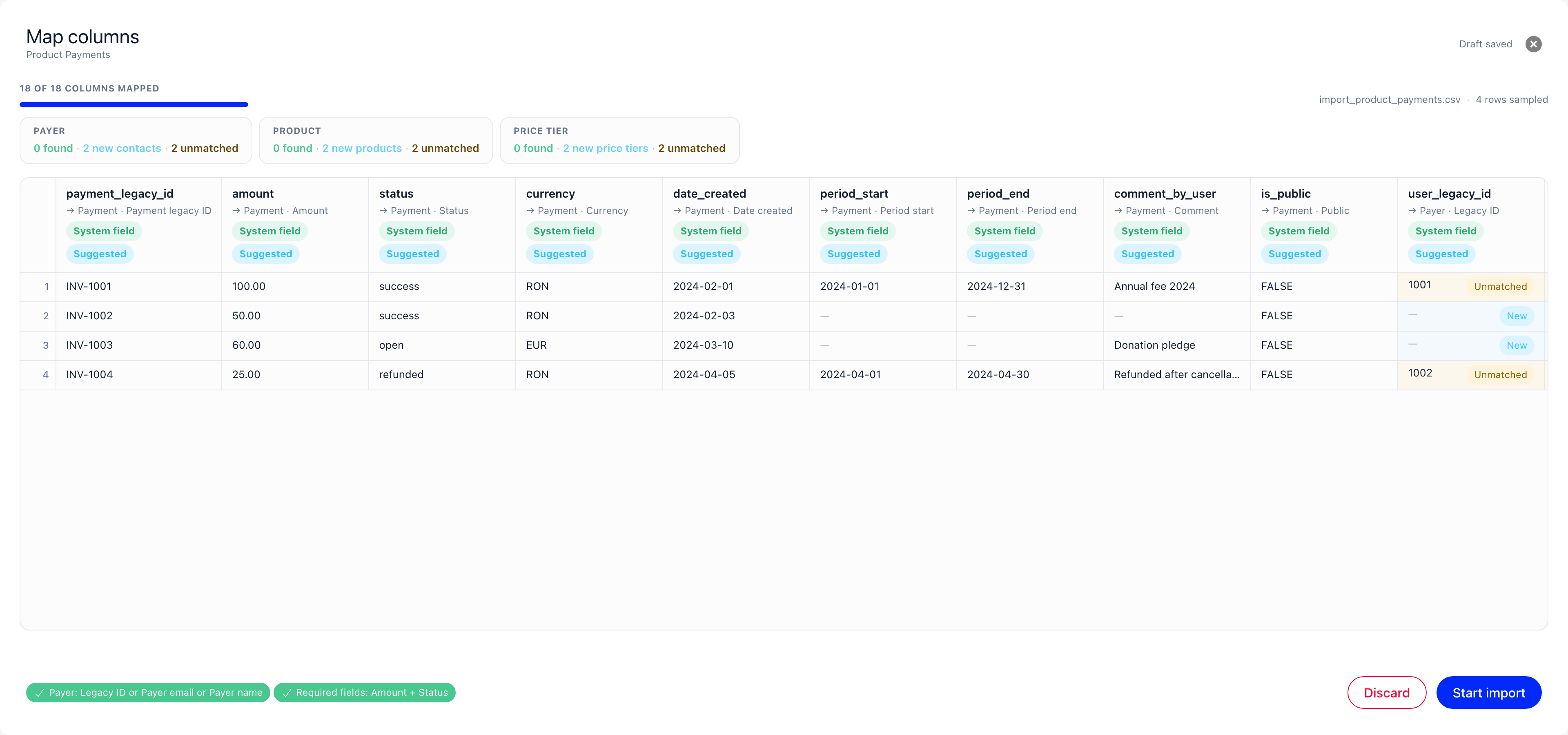
Reference columns and their groups
In the mapping screen, the columns that point at an existing record are gathered into groups named after the thing they identify: Payer, Product, Price tier, Member, Role, Unit, Company, Badge. A group usually offers several ways to name the same record, and you map at least one column per required group. A payer can be given by legacy id, by email, or by name; a role by legacy id or by name. The chips in the footer of the mapping screen spell out the choice for you, for example Payer: Payer email or Payer name, and turn green once one of the alternatives is mapped. Groups marked optional, such as Unit on a role file, can be left unmapped entirely. Where more than one column is offered, the order matters, and the rest of this page is about that order.The match preview
Once a group has at least one column mapped, a strip of tiles appears above the sheet, one tile per group, each with three numbers.
The sheet marks the individual cells too: a row that would create a record is
tagged New, and a row the chain cannot resolve is tagged Unmatched.
The tiles describe the mapping as last saved, so they refresh a moment after each
change you make and dim while the new answer is on its way.
The counts are rows, not people. Five rows naming the same payer show as five
under “new contacts” and produce one contact, because the creation step inserts
one record per distinct person, not one per row. Read the number as “rows that
will not attach to anything you already have”, which is an upper bound on what
gets created.
It never writes anything
Running the preview reads your data and nothing else. It looks up the values in your own organisation, counts what it found, and stops. No contact, product, price tier or anything else is created while you are still on the mapping screen, and nothing at all is written until you press Start import. You can change the mapping and let the numbers settle as many times as you like. Unmatched rows do not block Start import either. They are a warning, and it is your call whether to fix the file first.How each import type finds its records
Each group is tried in order, top to bottom, and the first step that finds something wins. The steps near the top are exact identifiers; the steps near the bottom are guesses at a name.Payments
Payer
If nothing matches and the row has no
payer_name, the row fails with Payer not
found for the supplied identifier.
Step 4 is the one that surprises people. An email that belongs to no member is not
an error: Orgo creates a contact and books the payment to the contact. The money
is recorded, but it sits on a contact record rather than on a member profile, and
a payment held by a contact can never be a membership fee. See
Contacts and money. If those payers are supposed to
be members, correct the email column and re-import rather than repairing
afterwards.
Price tier
Both groups are optional. Leave the product columns unmapped and the payment is
recorded with no product attached, which is how a donation looks. Products are
resolved before price tiers, so a tier can attach to a product that the same run
created moments earlier.
Role assignments
Nothing is ever created here. An unknown member or an unknown role fails the row
with not found for the supplied identifier, and the rest of the file carries
on. Unit is optional: if the row names no unit, or names one that does not
exist, the role is still assigned, without a unit. A unit name that matches two
units still fails the row.
Company memberships
Nothing is created. The company and the member both have to exist already, so
import your companies and your members before this file. A row naming either one
wrongly fails on its own.
Badge awards
Nothing is created. An award naming a badge you have not created yet fails,
so import your badge types and badges first.
List members
Adding people to a static list is mapped like the others, with a single Member group offeringemail, user_legacy_id, phone and name. It is the one type
with no match preview: the run applies its own order rather than the one the
mapping declares, so a preview would tell you something other than what happens.
The order it uses is a member by email, then a member by legacy id, then a member
by phone number, then a contact by email, then a contact by phone number. If
nothing matches and the row carries an email or a name, a contact is created and
added to the list. A row with only a name links to an existing contact who has no
email address and the same name, which keeps a repeated upload from duplicating
that person, at the cost of treating two people of the same name as one.
Choosing the columns that match reliably
Why an email column beats a name column. A name is only ever an instruction to
create somebody. An email is the one value Orgo looks for among your members
first, among your contacts second, and the only value that lets a second import
recognise a person the first import created. Names are matched for roles, units,
companies, badges and products, where a name is the record’s identity, but never
for people.
So if your file names people, include their email addresses. A large number under
“new contacts” on a payer column almost always means the email column is missing
or misspelled, not that all those payers are new.
Phone numbers are a poor key wherever they are offered. They are compared as
written, after trimming spaces at the ends, so
+40 712 345 678 and
+40712345678 are two different people.
Two behaviours to know before you re-import
A person with no email address is created again every time. Contact creation recognises a person it created earlier by email and by nothing else. Import a payment file whose payers have names but no email addresses, run it again next month, and every one of those payers is created a second time. This is deliberate: matching people by name inside one organisation would quietly merge two people who happen to share a name. The practical rule is that a file without emails is a one-shot file. The organisation column takes part in identifying a new contact. A contact is created per distinct combination of name and organisation. Two rows for Ana Pop, one withpayer_organisation filled in and one with it blank, are two different
people to the importer and produce two contacts, even when both rows carry the
same email address. Either fill the organisation column consistently for the same
person, or leave it unmapped.
Duplicate products and price tiers
Where two products share a name, or two price tiers share a name and amount on the same product, Orgo attaches every matching row to the oldest of them and says nothing. There is no warning in the strip and no error in the import log, because a bulk payment import is not allowed to stall on a pre-existing duplicate in your catalogue. This is the opposite of how duplicate roles, units, companies and badges behave, where two records of the same name make the reference ambiguous and fail the row.Troubleshooting
The preview says most rows are unmatched
The preview says most rows are unmatched
The column you mapped is not the one that identifies the record, or its values
do not exist in Orgo. Check three things in order: that legacy id columns hold
the ids from the system you are migrating from and not row numbers; that name
columns are spelled as the records are spelled in Orgo, accents included; and
that the column really is mapped to the group you think, since the tile only
reflects the mapping as last saved. Remember also that “unmatched” covers a
value that matches two records as well as one that matches none. The import log
separates the two afterwards, with a message saying the lookup is ambiguous.
A payment was booked against a contact rather than the member
A payment was booked against a contact rather than the member
The email in the row did not match any member, so the payer chain fell through
to its last step and created a contact. Usually the address in the file is an
old one, a personal address where the member is registered with a work address,
or misspelled. Fix the email column and re-import; correcting it on the contact
afterwards does not move the payment. See
Contacts and money for what a contact-held
payment can and cannot do.
My import created duplicate people
My import created duplicate people
Almost always one of two causes. Either the file names people without email
addresses, in which case every run creates them again, or the organisation
column is filled for some of a person’s rows and blank for others, which splits
them in two. Merge the resulting records from the contact list, then add or
tidy the email column before the next run.
A row failed because a role could not be found
A row failed because a role could not be found
Role assignments create nothing, so the role has to exist first. Either the
name in the file does not exist in Orgo, or two roles share that name and the
reference is ambiguous. Letter case does not matter; spelling and accents do.
Import or rename the roles first, or map
role_legacy_id instead of the name.
The same applies to units, companies and badges.The preview looks fine but the import created more records than expected
The preview looks fine but the import created more records than expected
The preview judged the first 20 rows. If your file is sorted so that the
well-identified rows come first, the rows further down can behave completely
differently. Sort or spot-check the file before importing, and after a large
run compare the counts in the import history with what you expected. A file
without email addresses, or with an inconsistent organisation column, will also
create more records than the row count suggests.
Related
- Data import what the wizard is and where to start
- Preparing your file formats, headers and column values
- Mapping columns the mapping screen and what blocks Start
- Custom fields in an import mapping onto profile fields and declaring new ones
- Import reference every import type and the columns it reads
- Contacts what a contact is and how the module is switched on
- The contact record what a contact record holds
- Contacts and money what a contact can pay for and where it appears
- Donations payments recorded without a product
- Products and prices products, price tiers and what makes them duplicate
- Companies corporate membership and company members