

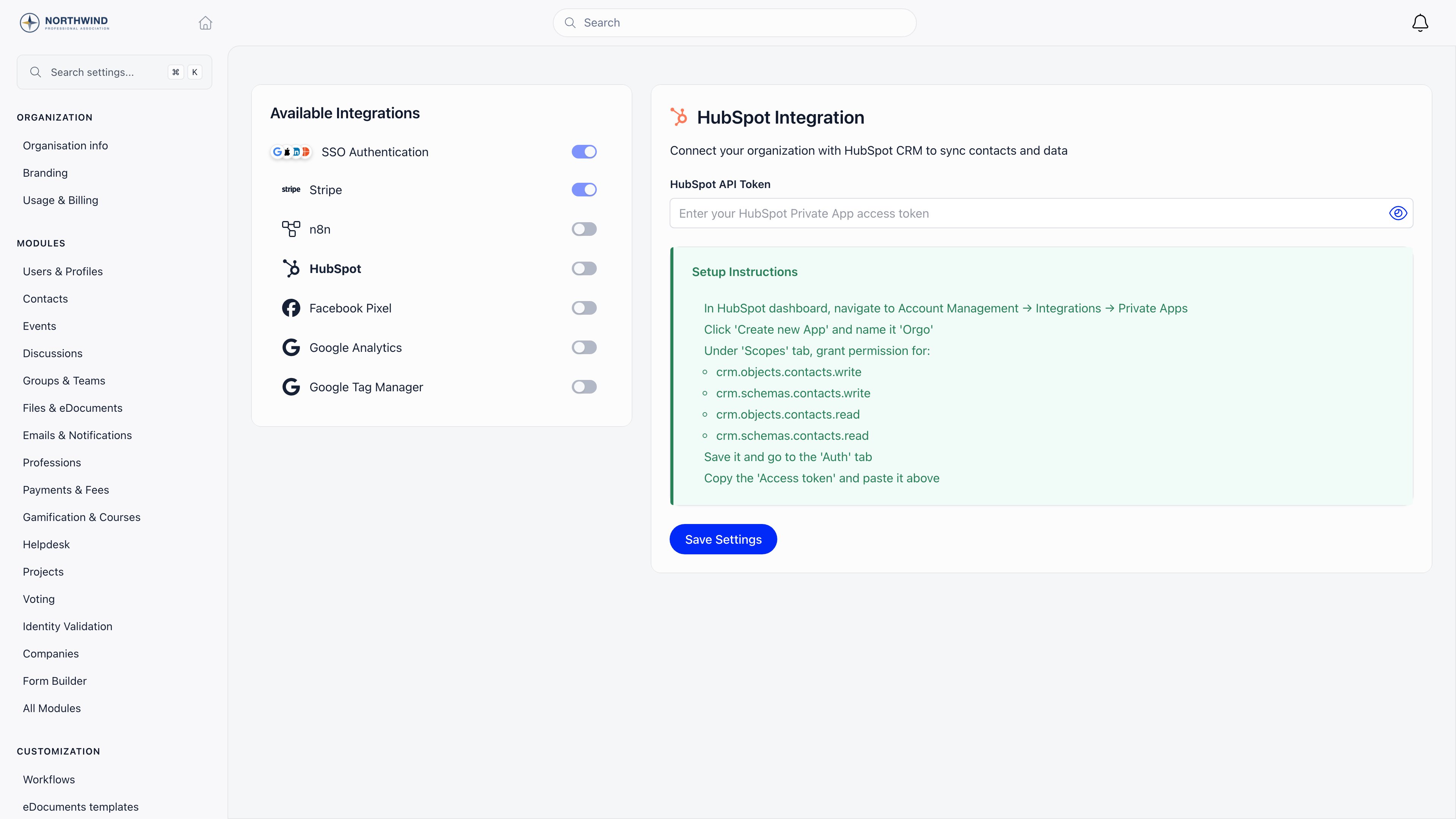
Where it lives
Settings → Developers → Third-party Integrations. Requires ADMIN_TENANT. The list on the left shows every available integration with a switch indicating whether it is configured. The switch itself is a status light: you configure each integration in the panel on the right and press Save Settings.
Selecting Stripe takes you to the payment settings; see Stripe Integration.
Single sign-on
Members can sign in with an account they already have instead of an Orgo password. Google, Microsoft and Apple appear as buttons on the login screen, in a browser and inside the mobile apps, including branded apps. You supply nothing: Orgo registers the applications with each provider centrally, so there is no client ID or secret to paste, and no per-domain restriction to configure. Where the switches on this page apply depends on the address members use:The LinkedIn switch exists in this panel but there is no LinkedIn button on the login screen today, so turning it on changes nothing.
HubSpot
Sync members and contacts into HubSpot as CRM contacts.1
Create a private app in HubSpot
Account Management → Integrations → Private Apps → Create new App, named Orgo.
2
Grant the contact scopes
crm.objects.contacts.read, crm.objects.contacts.write, crm.schemas.contacts.read, crm.schemas.contacts.write.3
Paste the access token
Copy it from the app’s Auth tab into HubSpot API Token and press Save Settings.
The sync runs in the background, one direction only: changes made in HubSpot are never written back to Orgo, and deletions are not propagated.
Saving a token is necessary but not always sufficient. If members and contacts are not appearing in HubSpot, ask support to confirm the HubSpot integration is switched on for your organization.
n8n
n8n is a visual automation tool with an official Orgo node, so you can connect Orgo to hundreds of other services without writing code.1
Enable n8n in Orgo
Toggle Enable n8n. It saves immediately.
2
Create an API token
Settings → Developers → API Tokens. Scope it to what the automation needs, see API Access.
3
Add the credential in n8n
Your organization’s host plus the token. Then build the workflow.
Analytics and tracking
Each of these takes a single ID and applies to your member-facing pages.
Google Analytics and Tag Manager receive page views plus a small number of commerce events raised by Orgo itself, including checkout start and completed purchases on payment and donation pages. Facebook Pixel receives page views only.
If you already run several tags, put the Tag Manager container ID in and manage the rest from there rather than filling in each field here.
Common questions
Analytics or Tag Manager?
Analytics or Tag Manager?
If Google Analytics is the only thing you run, the Measurement ID is enough. If you run several tags, use Tag Manager so you never have to come back to this page.
Can members sign in with more than one provider?
Can members sign in with more than one provider?
Yes. Enable as many as you want; members pick one on the login screen.
I need an integration that is not listed
I need an integration that is not listed
Two routes. Webhooks push events to any system that accepts an HTTPS POST, and the API covers everything else. For sign-in from your own application, see OAuth Server.
Does HubSpot sync historical members?
Does HubSpot sync historical members?
No. The sync fires when a member or contact is created or updated, so existing records appear as they change. To backfill, export and import on the HubSpot side.
Related
- Stripe Integration - payment setup in detail
- API Access - tokens and scopes
- Webhooks - real-time event delivery
- OAuth Server - Orgo as an identity provider
- Orgo MCP - connect AI assistants to your Orgo data