

Three states, not two
The Newsletter field on a contact has three states, and the third one is real: a contact who has never been asked is not the same as a contact who said no.
Only an explicit yes is ever mailed. Every audience query tests for the
subscribed state, so “never asked” and “unsubscribed” behave identically at send
time. A contact with no email address is skipped as well.
The Newsletter card on the record shows the current state with a single
Subscribe or Unsubscribe button, and the Newsletter filter on the
contacts list offers All, Subscribed, Not subscribed and Unsubscribed with a
count beside each, which is the quickest way to see how the three states are
spread across your database.
The contacts list keeps the three states apart. Lists and
segments do not: there, Not subscribed covers both
the people who said no and the people who were never asked, because neither group
can be mailed.
Which audiences include contacts
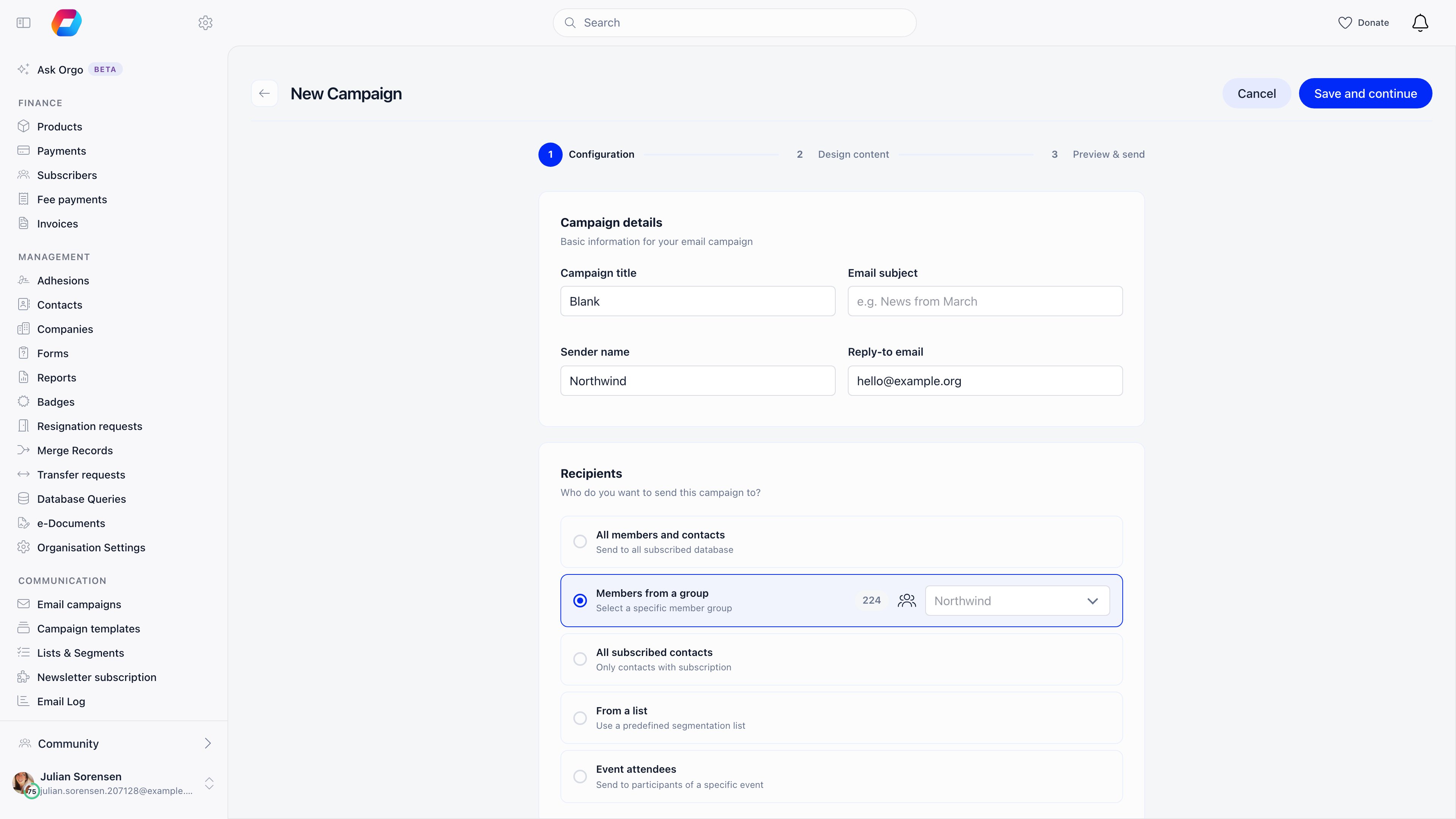
This is the thing readers get wrong most often. Two of the six audiences never touch a contact, whatever the contact list holds.
“All members and contacts” means everyone subscribed, not everyone in the
database. A contact who was never asked, has no email address, or sits outside
the local center the campaign belongs to is not in it.
When a campaign carries a local center, the resolved recipients are filtered to
that center at send time, whichever audience was chosen. Contacts with no chapter
are filtered out by the same rule, so a chapter campaign never reaches them, and
the recipient count applies the same filter and therefore agrees with the send.
How someone subscribes
The signup widget is the only path with a confirmation step. An address that
never clicks the link is never subscribed, never appears in the contacts list
through that route, and never appears in the widget’s Subscribers panel.
On the donation page, the event checkout and public forms, the subscribe checkbox
is ticked by default. An event or a payment page can hide it entirely through its
own settings, in which case that checkout subscribes nobody.
Unsubscribing
Every campaign carries an unsubscribe link, and Orgo appends one to the footer if your design has no placeholder for it. The same emails carry one-click unsubscribe headers, so a mail client can offer its own unsubscribe button. The link does not act on the click itself. It points at Orgo, which records nothing and redirects the browser to an unsubscribe page on your organisation’s address. That page then makes the change: for a contact, who is never signed in, it completes on arrival and confirms; for a signed-in member it offers a choice between the newsletter and all notifications. Because the address in the email only produces the redirect, a mail client or security scanner that pre-fetches links cannot opt anybody out. The link is also replaced after each use, so a link forwarded from an old email cannot be replayed. An administrator can do the same from the record: Unsubscribe on the Newsletter card. Subscribing someone who previously unsubscribed asks you to confirm that you are overriding their opt-out. Both buttons needHR_TENANT.
Bounces and complaints
When the mail provider reports a bounce or a spam complaint, Orgo switches that address off automatically. Bounced recipients are listed on the campaign’s report, and the report’s CSV export gives one row per recipient per recorded action, which is where to look before deciding whether a bounce was real.Lists and segments
A list is a saved audience, and it can hold members and contacts together. Its profile type is fixed when the list is created: Members & Contacts, Members Only, or Contacts Only. A contact joins a list in one of three ways:- By hand, through Add on a manual list. Adding someone already in the list is reported as skipped rather than failing.
- By CSV, importing into a manual list. Rows are matched to an existing member or contact first, and a row that matches nothing creates a contact.
- By criteria, on an automated list. There is no membership row at all: the list is whoever matches when it is read.
A manual list built from a search will usually show a Subscribed count well below
its Total, because most of the people added were never asked. A list built on
event attendance is the exception: it ignores the split entirely and reports its
total as subscribed, because event mail is treated as informational rather than
marketing.
What is recorded when consent changes
The one place a change is written down is the organisation-wide Activity Log: pressing Subscribe or Unsubscribe on a contact record writes an entry there naming the administrator, the contact and the time. That log needsADMIN_TENANT to read, and it covers only those two buttons.
If you need to evidence how someone came to be on your mailing list, do not rely
on the field:
- Prefer the newsletter signup widget. Its Subscribers panel lists everyone who confirmed through that widget with the date they did it, which is the only dated subscription record Orgo keeps.
- Read the record’s Source and creation date together. They tell you which path created the contact, which is a strong hint at how they arrived even though it is not a consent record.
- Write a note on the contact at the time, and keep the campaign CSV exports and the email log, which are dated per recipient.
- Keep your own record of the wording people agreed to, since Orgo stores the answer but not the question.
Orgo records what is described above and nothing more. Deciding what your
organisation needs to keep, for how long, and under which rules is a question for
your own advisers; using any part of the platform does not by itself make an
organisation compliant with data protection law.
Permissions
A chapter campaign manager, meaning someone holding
COMMUNICATION_LOCAL and no
tenant-wide communication permission, is offered only the Members from a group
audience in the form. That is a convenience, not the control. The real control is
applied when the campaign is sent: the resolved recipients are filtered down to
the chapters that manager holds, whatever audience was stored, so a request made
outside the interface still cannot reach another chapter’s contacts. Recipient
counts follow the same rule and are refused when they would not be capped.
Troubleshooting
A contact is not receiving campaigns
A contact is not receiving campaigns
Open the record and read the Newsletter card. Only Subscribed is
mailed, and a contact created by a donation, a ticket or by hand usually shows
Not subscribed because nobody asked. Then check the contact has an email
address, and that they fall inside the audience you used: Members from a
group never includes contacts. If your organisation uses chapters and the
campaign belongs to one, a contact with no chapter is filtered out. Once those
are ruled out, the email log and the campaign’s
CSV export show whether the message left and what the provider did with it.
Someone unsubscribed and still got a follow-up
Someone unsubscribed and still got a follow-up
Follow-ups to non-openers are built from who received the earlier campaign,
minus the people the mail provider reported as bounced, complained or
unsubscribed. They do not re-read the contact’s subscription field, so an
unsubscribe made through the link on your Orgo page does not remove that
person from the follow-up. For an audience that is checked against the field,
use All subscribed contacts or a list.
The audience count is smaller than my contact count
The audience count is smaller than my contact count
Expected. The count includes only contacts that are subscribed and have an
email address, and, on a campaign that belongs to a chapter, only contacts
assigned to that chapter. Open the contacts list and use the Newsletter
filter: the counts beside All, Subscribed, Not subscribed and Unsubscribed
usually explain the gap in one glance, and a large Not subscribed number
means those people were never asked rather than that they refused.
Someone unsubscribed and I do not know when
Someone unsubscribed and I do not know when
The subscription field carries no date and the contact’s Activity feed does
not show the change, so the record cannot tell you. If an administrator used
the button on the record, the organisation-wide Activity
Log has an entry with the administrator, the contact and the
time. Otherwise, narrow it down from the campaigns: the CSV export on each
campaign report lists unsubscribes per recipient, and a bounce or complaint on
a dated campaign explains an automatic opt-out.
A contact subscribed on the website but is not in the list
A contact subscribed on the website but is not in the list
The signup widget only stores someone once they click the link in the
confirmation email. Until then there is no contact and no subscriber row.
Ask the person to check their spam folder, and re-send by submitting the form
again, which is refused for five minutes after the previous attempt so a
double click does not send two emails. If they were already a member or a
contact, confirming switches that existing record to subscribed rather than
creating a second one, so look them up by email rather than by source.
Related
- Newsletter - building, sending, scheduling and reporting on a campaign
- Newsletter signup widgets - the confirmed-opt-in form for your website
- Newsletter builder - the editor, placeholders and templates
- Email lists - how a saved audience behaves once email starts moving
- Lists & Segments - building a list criterion by criterion
- Email log - what was sent to one address and what happened to it
- Contacts - what a contact is, and how it differs from a member
- The contact record - every field, the Newsletter card, statuses and tags
- Where contacts come from - every path that creates a contact
- Contacts and money - what a contact can pay for
- Contacts at events - registration, badges and the Event App
- Contact permissions - who sees, edits, exports and deletes contacts
- Activity Log - the organisation-wide record of who changed what