

HR_LOCAL means member management, limited to one chapter. FINANCIAL_TENANT means money, across the whole organization.
Built for organizations that delegate admin work across chapters, regions, or committees: professional associations, alumni networks, trade unions, and faith communities where different people manage different areas at different levels.
Replaces shared admin logins and informal trust-based access.
Permissions are not the same as roles and user types. A role like “President” is an organizational position; it grants access only if you attach permissions to it.
Two separate things grant access
Orgo has one account-level flag and one permission set, and they are not interchangeable.The six domains
Sidebar menu entries are only entry points: individual actions inside a screen can require more, and a few require the Orgo administrator flag instead.
Automatic inclusions
Holding one permission can imply another. This is the complete list; nothing else is implied.HR_TENANT does not imply HR_LOCAL as a separate grant. It does not need to: an organization-scope permission satisfies any check in the same domain at regional or local scope. Regional and local grants are the ones that need the chapter to match.The three scopes
An organization-scope permission always satisfies a check for the same domain at regional or local scope. The reverse is never true.
Regional and local scopes exist only when the Local Centers module is on, and regional scope also needs Enable Parent Centers. Without them, the only checkboxes shown are the organization-scope ones.
What “regional” means when chapters nest
Chapters chain to any depth, so regional scope is defined by an anchor chapter rather than by a fixed layer. The anchor comes from the holder’s own primary chapter and cannot be pointed elsewhere:
The grant then covers the anchor and every chapter beneath the anchor, however many layers down. It never reaches the chapter above the anchor and never crosses into another branch. A district officer whose district is flagged as a parent chapter therefore administers the district and its branches, and not the region above it.
The full worked example is on Local Groups.
Nesting widens administrative reach only. What an ordinary member without a regional permission can see did not change: their own chapter, the chapter directly above it, and the chapters sharing that same direct parent. It does not follow the chain further up. Reading another member’s User and Admin custom field values still requires being in the same chapter exactly, with no walk up the tree.
Complete permission reference
Twenty permissions exist. The UI shows them as six labels repeated under three headings: Organization: (your organization), Chapter: (chapter name) and Parent chapter: (region name).USER and USER_LOCAL mean “any signed-in member”. They never appear as checkboxes on a profile, only as the lowest option in the minimum access level dropdowns below.
How a check is decided
Orgo works through these steps in order.1
Organization boundary
If the record belongs to a different organization than you, access is denied. No permission overrides this.
2
Organization administrator shortcut
If you are an Orgo administrator or hold
ADMIN_TENANT, access is granted. This shortcut is skipped for the restricted sessions listed further down.3
Domain and scope match
Your permissions are expanded using the automatic inclusions above, then matched against what the action requires.
4
Chapter match, for regional and local permissions
For a local permission the record’s chapter must be your own chapter, your anchor chapter, or a chapter you were separately granted through Multi local center access. For a regional permission it must sit inside your anchor’s branch, at any depth.
5
Event user type restriction
If Restrict events by user type is on and the event names an allowed user type, a regional or local manager whose user type does not match is denied, even with the right permission.
Minimum access levels
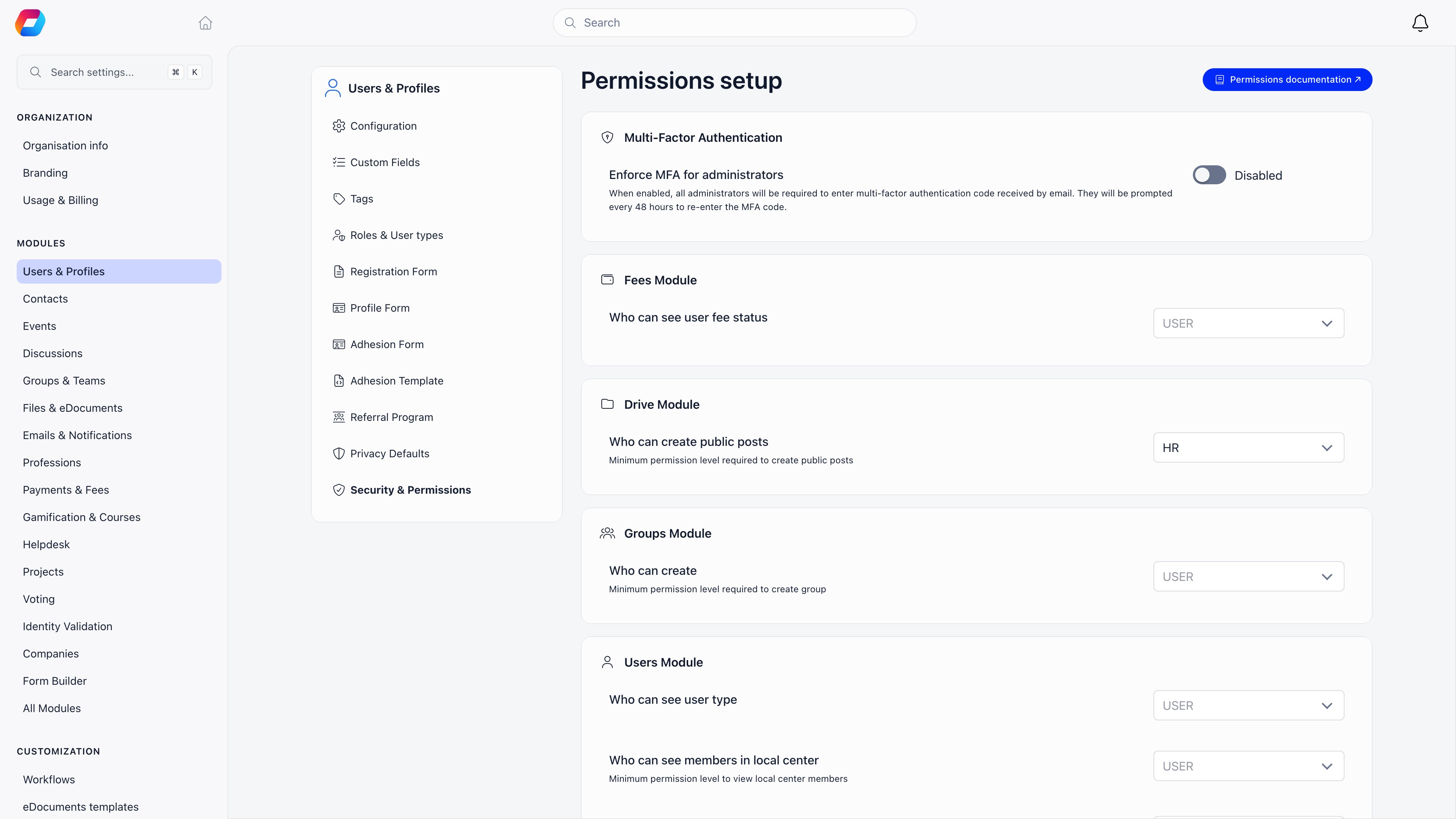
Some behaviour is not a permission you hold but a bar your organization sets, at Settings → Users & Profiles → Security & Permissions. It lists every switched-on module and the permission level each one requires.
The same screen carries Enforce MFA for administrators. With it on, administrators must enter a code sent by email and are asked again every 48 hours.
Sessions that carry fewer permissions
Four situations narrow a session below what the member actually holds. In all four the organization administrator shortcut is switched off.- Permission impersonation. An administrator previews the product as a lower permission set. See Assigning Permissions.
- Event app sign-in. A ticket holder or host signing in with a one-time email code gets member-level access plus the Event Manager family only. Organization-wide administration is never reachable that way, even for an administrator.
- Scoped API tokens. A token is limited to the categories chosen when it was created, and cannot inherit the organization administrator shortcut. See API.
- Connected apps. An app acting with its own credentials is capped at plain member access.
Related
- Assigning Permissions - who may grant what, and how to test it
- User Types & Roles - positions you can attach permissions to
- Role Groups - groups that fill themselves from roles
- Modules - the switches that make permissions visible
- Local Groups - chapters, parents, and what local scope means