

How to enable
Settings → Modules → Users & Profiles → Configuration → Family & Relationships. RequiresADMIN_TENANT.
Both toggles are switches on the Users & Profiles configuration page. Turning on Non-Member Family Profiles alone shows the Family tab but leaves it empty: the family panel itself renders only when Enable Family Members is on.
Where families live
Members open Profile → Edit → Family (route/users/edit/{id}). A member sees their own family there. Anyone with HR_LOCAL for the member’s local centre sees, and can manage, the family from the same tab on that member’s profile.
A read-only summary also appears on the profile page itself: linked members as avatars, non-member relatives as a name plus email and phone. That block is visible to the member and to HR_LOCAL administrators only.
Creating a family
One family per person. A member who is not in a family yet sees Create Family, which names the record after them (for example “Maya Marino Family”) and makes them the owner. When an administrator creates a family from someone else’s profile, Orgo asks what that person’s place in it should be: Parent/Owner or Child. Picking Child creates the family without an owner and adds the person as a child, which is what you want when the responsible adult is not in the system yet.Ordinary members can create their own family and can add non-member relatives to it. Adding an existing organization member to a family requires
HR_LOCAL. Members without that permission see: “For privacy reasons, only chapter or association administrators can add organisation members to a family.”Adding people
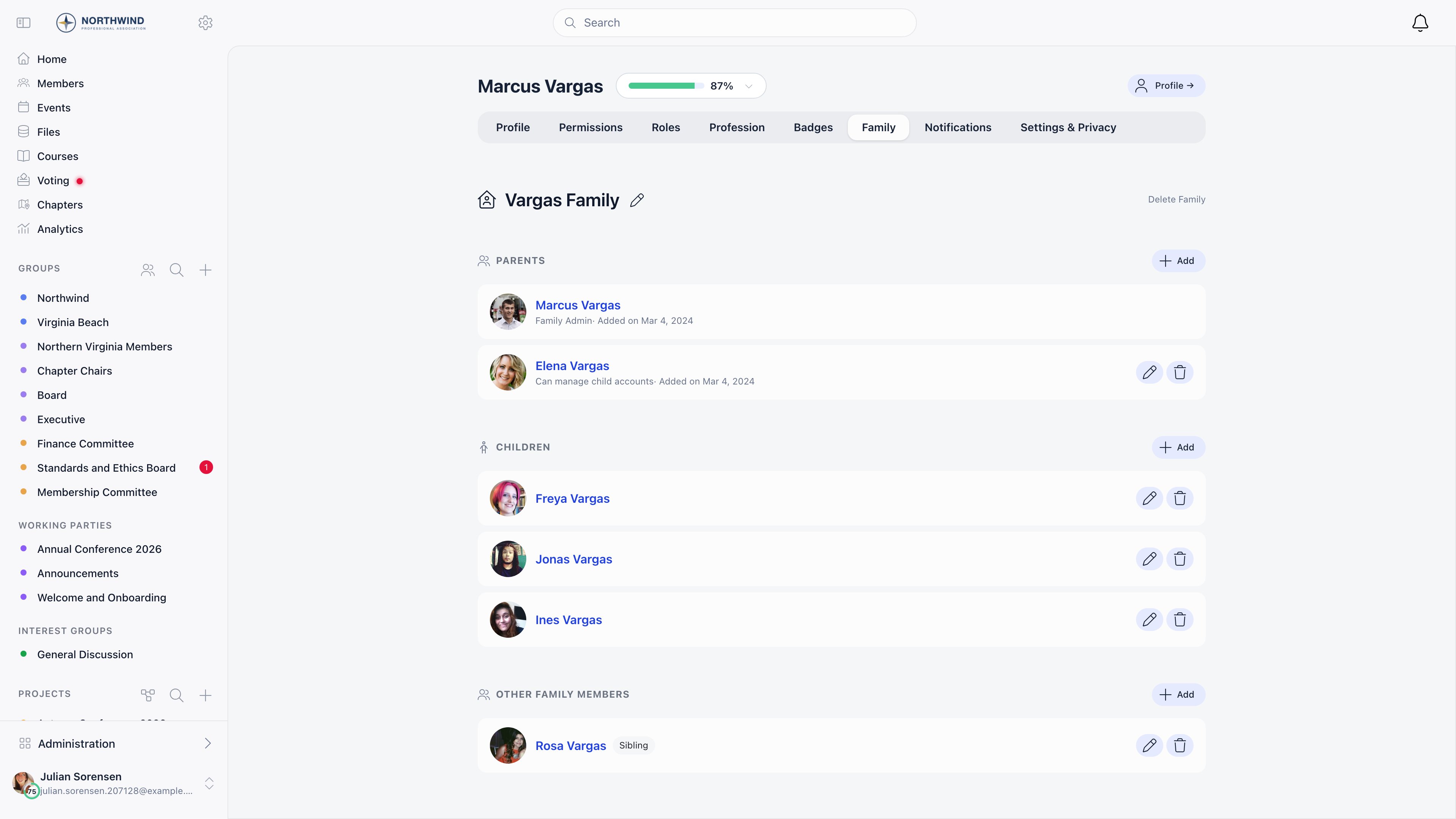
The family panel has three sections, each with its own Add button.
In the Parents section, a row that is a member account carries a grey line under the name: Family Admin or Can manage child accounts, then Added on and the date that person joined the family. Children, other relatives and non-member profiles show the name and its tags only.
The add dialog asks three things:
1
Pick the relationship
Parent (can manage child accounts), Child (account managed by parent), or Other member (guardian, grandparent, and so on).
2
Answer 'Is member of {your organization}?'
Yes searches existing member accounts. No takes a first name, last name and an optional email, and stores the person as a non-member profile.
3
Optionally grant child management
A Can manage child accounts switch appears for anyone who is not a child. Parents and guardians receive it automatically.
Registering a child who has no account
From the Children section you can create the account outright. Orgo asks for an optional email, first and last name, birthday and gender, then:- Creates an active user account with
accountTypeset tochild - Records parental consent (date and method) on both the account and the family membership
- Creates the parent’s family if they do not have one, adds the parent as owner, and adds the child
- Marks the email as confirmed, since the parent supplied it
Removing people and deleting a family
Any member of a family with management rights can remove others; you cannot remove yourself. Removing someone deletes the family link, not their account. Deleting the whole family is a link at the top right of the panel. It only works once every member except the owner has been removed, otherwise Orgo answers “Cannot delete family with other members. Please remove all members first.”Families and fees
Family membership does not change what anyone pays. Fees are resolved per member. Linking a child to a parent does not transfer, discount, or cover the child’s fee, and there is no family price tier. If you need one payer to cover several people, use Companies or a fee bundle instead.Age settings
Two age values exist on the tenant, Children Auth Restriction Age and Minimum Registration Age, but only the second one has any effect today, and neither is editable from the settings screen: both fields are hidden pending backend enforcement.- Minimum Registration Age is read when a parent registers a child. Below it, the child’s waitlist entry is marked underage.
- Children Auth Restriction Age does not restrict authentication. It only drives a notification when a young member reaches that age.
Common questions
A parent wants to register their 10-year-old
A parent wants to register their 10-year-old
The parent registers themselves, opens Profile → Edit → Family, creates their family if they do not have one, then uses Add in the Children section and chooses to register the child. The child is linked automatically.
Can both parents be linked to the same child?
Can both parents be linked to the same child?
Yes. Add both at parent level in the same family. Parents are not restricted to one family, so a parent already in another family record can be added without being moved out of it.
Can a member add another member to their family themselves?
Can a member add another member to their family themselves?
No. Adding an existing account requires
HR_LOCAL. Members can add non-member relatives (name, email, phone) on their own.What can a parent do with a linked child's account?
What can a parent do with a linked child's account?
They can see the child in the family panel and open the child’s profile. Can manage child accounts is recorded on the membership and controls who may add and edit members inside that family. It does not grant a parent the ability to act as the child elsewhere in the platform.
Related
- Companies - one organization paying for many members
- Waitlist - where underage children are held
- Registration Form - the birthday field
- Profile Fields - what a child profile can store
- Privacy Settings - who can see whom