

Turn it on
Settings → Modules → Events → Reporting & Analytics → Event Reports. Changing it requiresADMIN_TENANT.
The setting is off by default. Once it is on, every event gains a Report entry in the
event sidebar, next to Participants and Tickets.
The report form
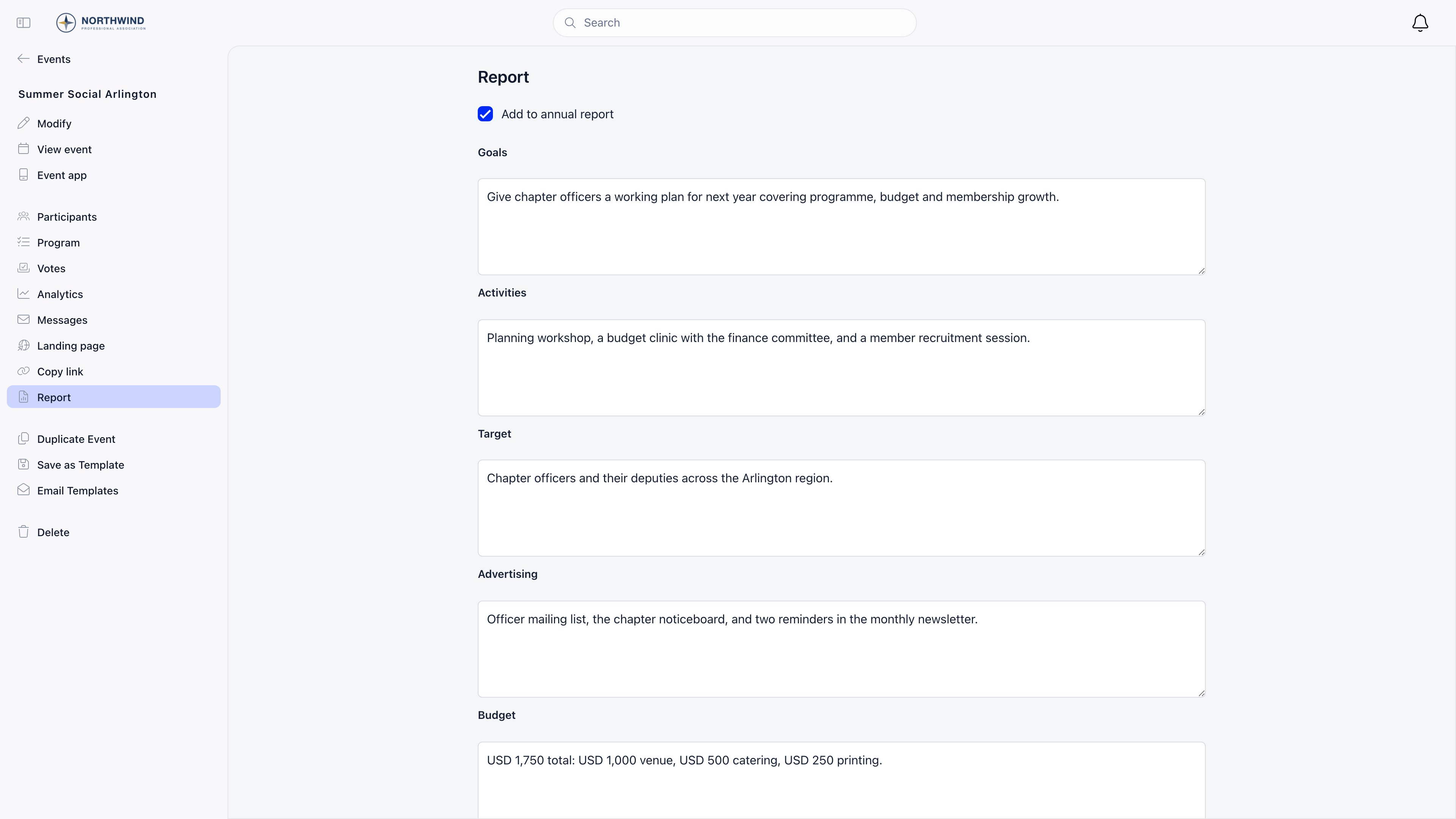
The form has six fields and a save button. Nothing is mandatory, and you can come back and edit it at any time.
All five text fields accept line breaks, so you can write short paragraphs or bullet-style
lists. They are stored as plain text: there is no rich text editor, no formatting toolbar,
and no image upload inside the report.
Photos are not part of the report form. They live in the event’s own media gallery on the
event page, and the annual report pulls its images from there.
Who can fill one in
Saving a report writes to the event itself, so it needs the same permission as editing the event: you must be the event owner, or hold EVENT_LOCAL for the event’s local centre.EVENT_TENANT and ADMIN_TENANT satisfy that check organisation-wide.
Where the report appears
Target and Number of participants are stored on the event and returned by the API, but no
screen in the app displays them. Treat them as data you are recording for export and
reporting rather than something members will read.
The report block is part of the member-facing event page, not the public one. The report
fields are excluded from the anonymous event payload, so nothing you write here is visible
to visitors on the public event page.
What event reports do not do
These are worth stating plainly, because reporting features in other tools often work differently:- They do not gate anything. An event can be published, finished, duplicated or deleted whether or not a report exists. No status depends on it.
- They do not have a draft or published state. A saved report is immediately visible to everyone who can see the event page.
- They do not calculate attendance. Number of participants is typed in by hand and is never reconciled against check-ins. For counted figures use Analytics, which reads the attendee records directly.
- They do not track volunteer hours or SDG alignment. SDG tags are set on the event itself, not in the report, and are not summarised anywhere in reporting.
Common questions
The host never wrote a report. Can an admin do it?
The host never wrote a report. Can an admin do it?
Yes. Anyone with EVENT_TENANT, or EVENT_LOCAL for that local centre, can open the event
and fill the report in afterwards. There is no time limit.
Why is the annual report checkbox missing?
Why is the annual report checkbox missing?
It only renders when Annual Event Reports or Local Annual Report is enabled in
the Events module. With both off, the report is still usable, it just cannot feed an
annual compilation.
Can I get the reports out in bulk?
Can I get the reports out in bulk?
Not from this screen. The annual report gathers them for one local centre over a date
range and prints, and the fields are available on the events API for anything more
involved.
Related
- Annual Report: compiling reports for a local centre
- Analytics: counted attendance, capacity and revenue
- Attendance: participant records and statuses
- Events Overview: module settings and the event lifecycle