

Recurring or one-time
A membership level is sold as a one-time price, as a recurring subscription, or as both. That distinction decides everything else here. On a subscription, the card is charged automatically at the end of each period. The member gets no renewal reminders, because the reminder job skips anyone with an active subscription on that fee product; they get a Renewal Confirmed or Renewal Failed email after each charge instead. On a one-time payment, nothing is charged automatically and the membership lapses on the validity date unless the member pays again. That is what the ladder below exists for. A payment recorded by hand, a bank transfer entered by an administrator for example, is a one-time payment even when the level also supports subscriptions, because there is no card on file to charge next time. That is the usual reason a member you expected to renew automatically did not.The reminder schedule
One job runs daily at 18:00 UTC and sends at most one email per member per day, to members whose validity date falls exactly on a milestone:
Nothing is sent between the rungs or after 30 days past expiry: a member who
lapses and never returns hears from Orgo seven times, then stops.
Worked example: a membership expiring on 30 June
Each rung is matched against the validity date exactly, so the whole ladder for one member is fixed the moment their validity date is known. For a membership valid to 30 June 2026, and taking that date as an example:
Nothing arrives on any other day, and the moment they pay, their validity date
moves and the remaining rungs no longer match. Because the match is on the exact
date, a rung the job misses is not sent late: it is skipped.
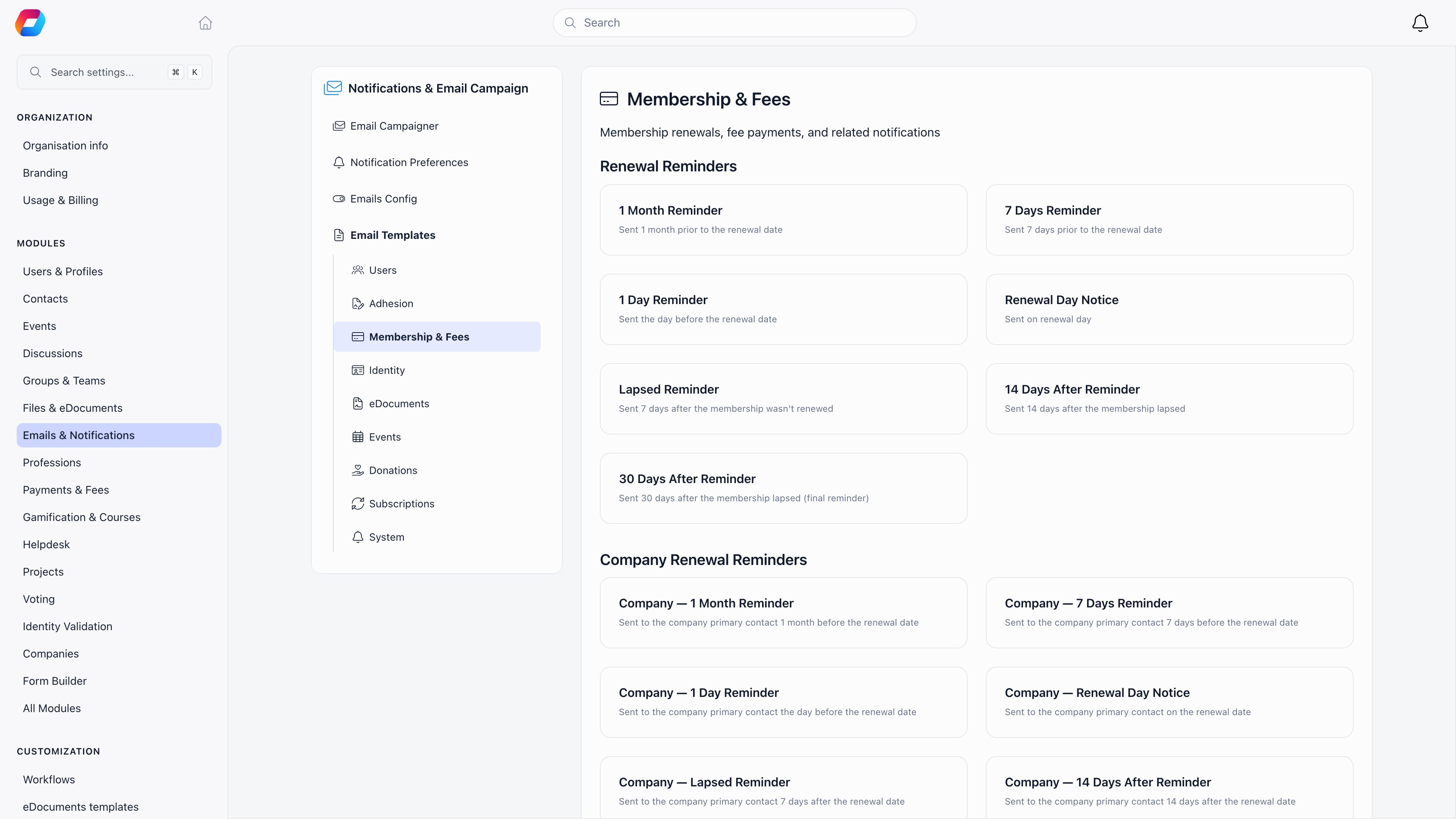
The 1 Day Reminder appears on the Emails page and can be edited,
but the daily job has no milestone that reaches it, so it is not currently sent
to individual members. The company version of that reminder is sent normally.
What an expired membership actually changes
Two different things are tracked, and the difference explains most support questions. The validity date has passed the moment the date is behind you, and for anyone who never paid. The fee is no longer active only after grace: Fee Valid Months and Fee Valid Days, under Settings → Payments & Fees → Membership fees → Validity Period, extend the window in which a member still counts as paid, and a lifetime level stays active forever when Lifetime Membership Available is on. Without grace the two coincide. Once the fee is no longer active:- their status shows unpaid on their profile and in the member directory, and My Membership Fee in their own menu carries a Due tag;
- member-only ticket prices stop: events return an empty member-price list, so they see the public price;
- they cannot create a referral for someone else, and get “You cannot create referrals at the moment” if they try;
- with Require Contract for Membership on, their signed membership contract is cancelled, so they must sign again before buying a new membership.
When fees are mandatory
Settings → Payments & Fees → Membership fees → Membership Requirements → Fee Payment Mandatory redirects a member whose validity date has passed to their own fee page on every navigation until they pay. It keys on the validity date, not the grace window. Still reachable, so the payment can be completed: the profile fee and payments tabs, product payment pages, onboarding, document previews, donation pages and the payment confirmation page. The mandatory-course gate stands down while a fee is owed. The redirect never applies toHR_TENANT or FINANCIAL_TENANT holders,
to user types not eligible for a fee, or inside the event app.
With Company Fee Payment Mandatory on, a member of a company follows the
company fee instead: primary contacts and financial representatives go to a
company payment page, everyone else to a page explaining that the company fee is
outstanding. ADMIN_TENANT holders are exempt.
Automatic deactivation
Off by default, available only when fees are mandatory: Auto-deactivate on Fee Expiry plus Days Until Deactivation (1 to 365; a tenant with a delay outside that range is skipped rather than deactivated). A daily 07:00 UTC job sets any active member whose validity date is older than the delay to inactive, skipping user types not eligible for a fee and lifetime levels when lifetime membership is enabled.How a member renews
From the user menu, My Membership Fee, or from their profile’s fee tab: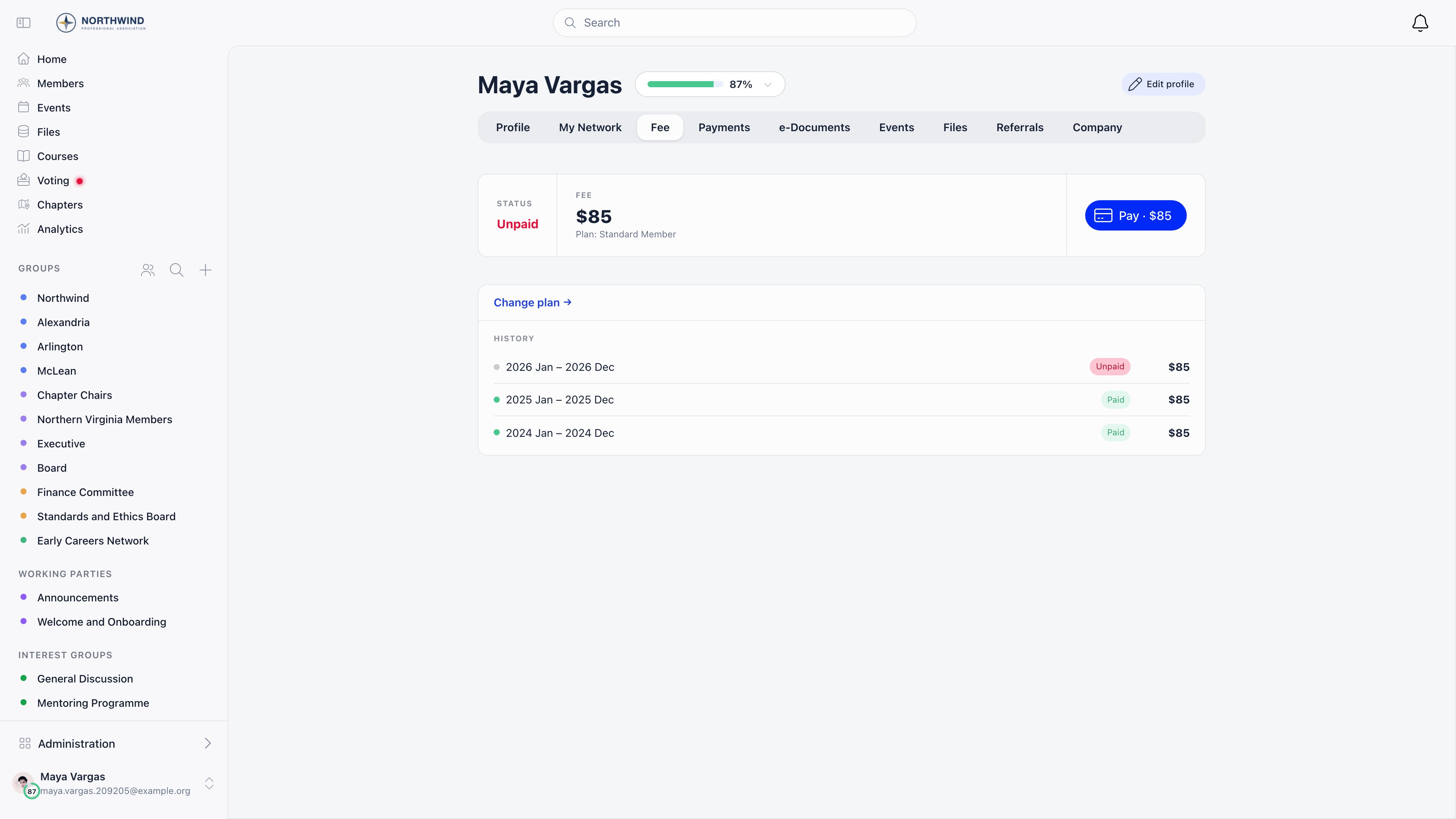
Members can switch membership level only while expired, and only when more than
one level is available to them. A
FINANCIAL_LOCAL holder can change someone’s
level at any time.
Renewing early. Paying is always allowed once the membership has expired or
was never paid. Before expiry it is allowed only inside the advance-payment
window, at Settings → Payments & Fees → Membership fees →
Eligibility Rules:
After any payment the validity date is set to the end of the last period paid
for, so an early renewal extends the membership rather than restarting it from
the payment date.
Example. An annual membership valid to 30 June 2026, with the default one
month advance window and Fixed Starting Date for Fees off, so periods follow
the member rather than the calendar. The member pays on 12 June 2026. The new
period does not start on 12 June: it starts where the old one ended, so the
membership now runs
to 30 June 2027 and the renewal date stays put year after year. The same holds
inside a grace window: with Fee Valid Months set to 1, a member who pays on
15 July 2026 still counts as active at that moment, so they too resume from
30 June and lose nothing for being late.
Stopping an automatic renewal
A subscriber’s fee card reads “Auto-renewing membership” with an action to cancel it, then “Auto-renewal ending” with the last day they are covered. Only the member themselves or aFINANCIAL_TENANT holder can cancel.
Cancelling stops future charges. It does not refund anything already paid and it
does not end the current period early: the member stays active until the period
they paid for runs out, and from that point counts as a one-time payer, reminders
included.
Troubleshooting
A member says they never got a renewal reminder
A member says they never got a renewal reminder
Work down the list. Do they have an active subscription on the fee product
(subscribers are skipped by design)? Is their membership covered by a company
(the company is chased instead)? Is their user type marked as not eligible
for a fee? Is the fee period shorter than two months? Then check that the
reminder is switched on under Membership & Fees at Settings →
Emails & Notifications → Emails. Finally, look at their validity date: the ladder matches
it against the exact milestone dates, so a validity date that was edited or
recalculated in between can step over a rung entirely.
Members on a monthly membership never hear anything
Members on a monthly membership never hear anything
Expected. The under-two-months rule is read from whichever period applies to
that member, so a level with a one-month Cycle period (in months) override
is skipped even on an annual product, and selling the level as a subscription does not
put it back in. Monthly subscribers still get their per charge Renewal
Confirmed or Renewal Failed email, which is the only mail they should be
getting.
A member on automatic renewal was not renewed
A member on automatic renewal was not renewed
Either the card was declined, in which case Stripe’s failure notice reaches
Orgo and the member is sent Renewal Failed, or there was never a
subscription in the first place. The second case is the common one: a payment
an administrator recorded by hand, or a bank transfer, leaves no card on file,
so a level being sold as recurring does not by itself make the member a
subscriber. Check the Subscribers tab of the fee product before assuming
a member is on automatic renewal.
A member cannot switch to the level I told them to pick
A member cannot switch to the level I told them to pick
The level chooser only offers prices that are not archived, not company only,
not hidden from members, and it only appears to the member while their
membership has expired and more than one level is open to them. A price marked
Is only assignable by admins (hidden for members) is invisible to them by
definition: a
FINANCIAL_LOCAL holder has to assign it, and can do so at any
time rather than only at expiry.Auto-deactivation ran but some expired members are still active
Auto-deactivation ran but some expired members are still active
The job only looks at members who have a validity date. Someone who never paid
at all has no date, so they are never deactivated by it, however long they have
been on the books. Also skipped: user types not eligible for a fee, and lifetime
levels while Lifetime Membership Available is on. If nothing at all
happened, check that Fee Payment Mandatory and Auto-deactivate on Fee
Expiry are both on and that Days Until Deactivation is between 1 and 365,
since a value outside that range skips the whole organisation.
A lapsed member is stuck on the payment page and cannot pay
A lapsed member is stuck on the payment page and cannot pay
With Fee Payment Mandatory on, the redirect keys on the validity date, so
it starts the day the date passes even when a grace window is still running.
The pages needed to complete a payment stay reachable, so if the member is
truly stuck it is worth checking the blockers on the fee itself: an unsigned
membership contract when Require Contract for Membership is on, a bank
transfer already in progress, or an active subscription. See
Membership Fees.
Related
- Membership Fees for collecting and tracking dues
- VAT & Registration Fees for what is added on top of the price
- Products for membership levels and periods
- Recording a payment for offline payments
- Stripe Integration for subscriptions and card charges