

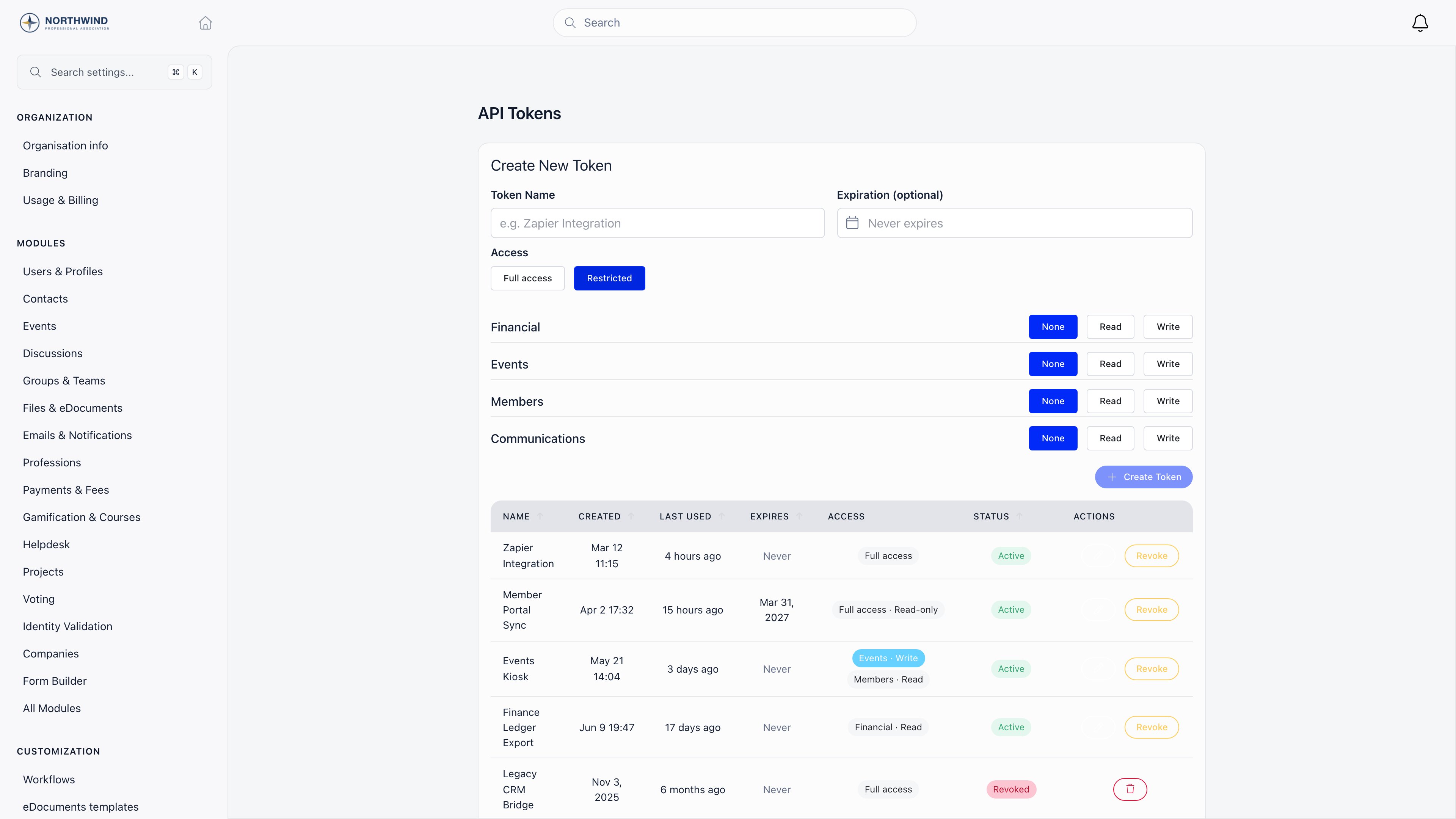
Where it lives
Settings → Developers → API Tokens Creating, editing, revoking and deleting a token all require ADMIN_TENANT. The menu entry appears only when API access is switched on for your organization. The full endpoint catalogue, request and response shapes, and error formats are in the API Reference.Creating a token
1
Name it
Use the integration’s name, not a person’s. The name is the only thing you will recognise it by later.
2
Set an expiry (optional)
Any date from tomorrow onwards. Leave it empty for a token that never expires.
3
Choose the access
Full access (optionally Read-only), or Restricted with a per-area level. See below.
4
Copy the token
It is shown once, in a yellow banner. Orgo stores only a hash of it, so a lost token cannot be recovered: create a new one and revoke the old.
Limiting what a token can reach
A token does not have to carry everything you can do. The Access control has two modes. Full access behaves like your own account. The Read-only switch then restricts it toGET, HEAD and OPTIONS; anything else is rejected with 403.
Restricted gives you a matrix: four areas, each set to None, Read or Write.
A few resources belong to more than one area: a contact is reachable with either Financial or Members, a newsletter with either Communications or Events.
This is the answer to “can we let a developer or an external tool work with our member data without exposing payments?” Yes. Grant Members and leave Financial on None.
- Default deny. Anything not covered by a granted area is refused, not merely filtered. Reference data (countries, towns, tags, custom-field definitions, the token owner’s own notifications) stays readable, but not writable.
- Never administrative. Tenant settings, OAuth apps, webhooks, email templates and the email log, imports, workflows, projects and tasks are out of reach for a restricted token whatever you grant it.
- No escalation. A restricted token cannot assign a member a role carrying a permission the token does not itself hold at Write, and cannot rewrite role-group structures at all.
Managing tokens
The table shows each token’s name, creation date, last use, expiry, access and status.
You see and manage the tokens you created, not other admins’. Every create, scope change and revoke is recorded internally with the actor and the before and after scope, so support can reconstruct who changed what.
A token also stops working if the account that owns it is no longer active, so revoke tokens as part of offboarding rather than relying on the account alone.
Volume and limits
Requests are counted per token per day. Settings → Usage & Billing shows API requests over the last 30 days against your plan’s allowance. There is no per-minute quota tied to your plan. A handful of expensive or abuse-sensitive endpoints have their own limits and answer429 with a Retry-After header: see Rate limits for the list and a retry pattern.
Keeping tokens safe
Never put a token in client-side code
Never put a token in client-side code
A token carries the permissions of the admin who created it. Anything in a browser, a mobile app or a public repository is compromised the moment it ships. For user-facing sign-in, use OAuth instead.
One token per integration
One token per integration
Separate tokens mean you can revoke one integration without breaking the others, and the Last Used column tells you which ones are actually in use.
Grant the narrowest scope that works
Grant the narrowest scope that works
Read-only where the integration only reads, and a restricted scope where it touches one area. The blast radius of a leaked token then stops at data it could already see.
Set an expiry on anything temporary
Set an expiry on anything temporary
Contractor access, a one-off migration, a proof of concept: give it a date and let it lapse on its own.
Related
- API Reference - every endpoint, parameter and response
- Webhooks - get pushed events instead of polling
- OAuth Server - let members sign in to your own app with their Orgo account
- Orgo MCP - connect AI assistants to your Orgo data
- Integrations - HubSpot, n8n, analytics and SSO