

This is not the same feature as Invitations.
Invitations are an existing member reaching out to someone new. The referral
program is other members vouching for someone who has already registered. They are
configured on the same settings page but work independently.
Setting it up
Settings → Users & Profiles → Referral Program. Requires ADMIN_TENANT.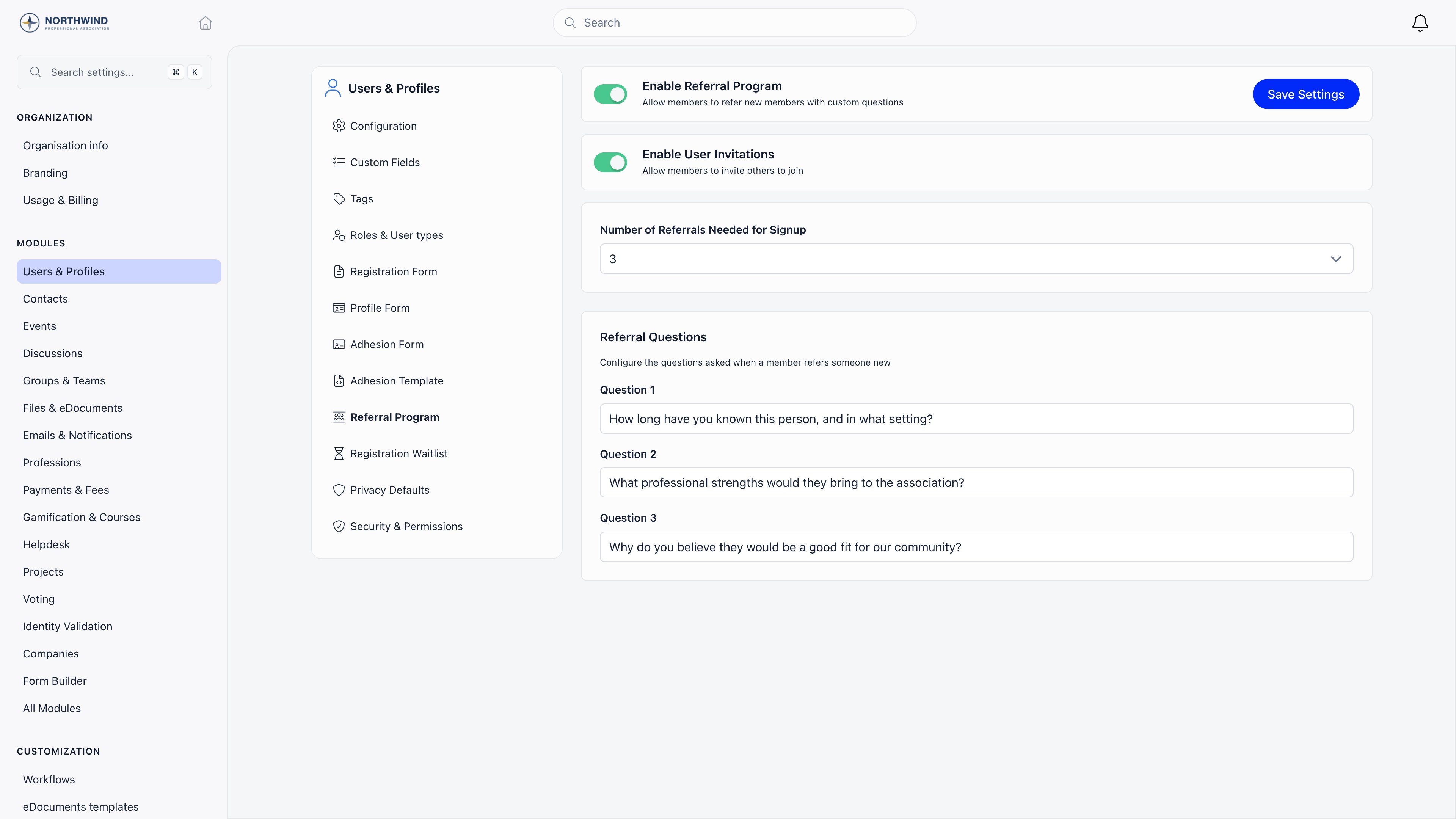
Both switches have to be considered together: the program only holds new signups
when Enable Referral Program is on and the number is 1 or more. With the
number left at None, the program is on but nothing is gated.
Write questions that ask for something concrete, for example “How long have you
known this person?”, “In what capacity have you worked with them?”, “Why should
they be a member?”. The answers are stored verbatim and are visible on the
profile, so they double as your admission record.
What happens to a new signup
1
They register and confirm their email
Registration itself is unchanged: your normal registration form, the usual
email confirmation code.
2
Their account is held
Once the email is confirmed, their status becomes Awaiting referral and a
referral record with a unique link is created for them. They cannot sign in
while they are in this state.
3
They receive their referral link
An email tells them how many referrals they need and gives them a link of the
form
https://<your app host>/refer/<code>. The confirmation screen shows the
same link with a copy button and the message that they need referrals from N
members of your community.4
Members vouch
Anyone signed in who opens that link sees the applicant’s name, answers your
three questions and submits. One member can only vouch once for the same
applicant.
5
The gate opens
When the number of vouches reaches the configured number, the account is
activated, or set to Unapproved if Manual Approval is on. The applicant is
emailed that they can proceed, and administrators are emailed too.
Who can vouch
The profile route also lists the ten most recent people awaiting referral as
shortcut buttons, and has a member search restricted to applicants awaiting
referral, so staff can work through the queue without collecting links.
Vouching is not anonymous. Each vouch is stored with the voucher’s name and their
three answers, and appears on both profiles: under Referred by on the
applicant’s Referrals tab and under Referrals given on the voucher’s. There is
no rating, score or approval step on a vouch: submitting one counts.
Members you add yourself are exempt
The gate only applies to self-signup. A member created by a signed-in administrator keeps the status you configured for admin-created users and gets no referral record, so you can always add people directly. Imported members are not gated either.Seeing referral activity
On a member’s Referrals tab:- Referred by shows every vouch that member received, with the voucher and the full answers.
- Referrals given shows every applicant that member vouched for, with the same answers.
Common scenarios
We want vouching, but people should not be locked out while they wait
We want vouching, but people should not be locked out while they wait
There is no partial mode: while the requirement is 1 or more, applicants cannot
sign in until they reach it. If you want new people to have access immediately
and be reviewed afterwards, leave the requirement at None and use Manual
Approval or Adhesion instead.
An applicant lost their referral link
An applicant lost their referral link
The link is stable and can be regenerated by attempting to sign in: the login
response returns them to their referral page. Administrators can also find the
applicant in the member directory by filtering status to Awaiting referral, and
vouch for them directly from the Referrals tab if they hold HR_LOCAL.
Nobody is vouching and applications are piling up
Nobody is vouching and applications are piling up
Filter the member directory by the Awaiting referral status to see the backlog.
Staff with HR_LOCAL can clear it from the Referrals tab, and any member can
still be activated directly by changing their status to Active, which bypasses
the gate. A second vouch from the same member for the same applicant is
rejected, so the backlog cannot be cleared by one person vouching repeatedly.
Do the answers stay private?
Do the answers stay private?
No. They are shown on the applicant’s profile and on the voucher’s profile to
anyone who can see those tabs. Do not ask for anything you would not want the
applicant to read.
Related
- Invitations - members bringing in new people by email or link
- User Statuses - what Awaiting referral and Unapproved block
- Registration Form - the signup that precedes vouching
- Adhesion - a formal application instead of vouching
- Permissions - what HR_LOCAL and ADMIN_TENANT cover