

Turning it on
Settings → Payments & Fees → Membership fees, section Local Center Fees. RequiresADMIN_TENANT.
Setting up one chapter
1
Open the chapter's Fees settings
Finance → Fees settings in the sidebar, or open the chapter and pick Fees settings in its settings sidebar. The screen itself requires
ADMIN_LOCAL on that chapter (ADMIN_TENANT qualifies everywhere).2
Create the chapter fee product
With no chapter fee product yet you get Start local fees by adding your first product and an Add product button. A fee product created by anyone who is not
FINANCIAL_TENANT is stamped with their own chapter, and if that chapter has no fee product yet it is set as the chapter’s fee product automatically.3
Add the price tiers
Add price opens the product’s Prices tab. Each price is one membership level (for example Youth, Adult, Family). Archived prices are not offered.
4
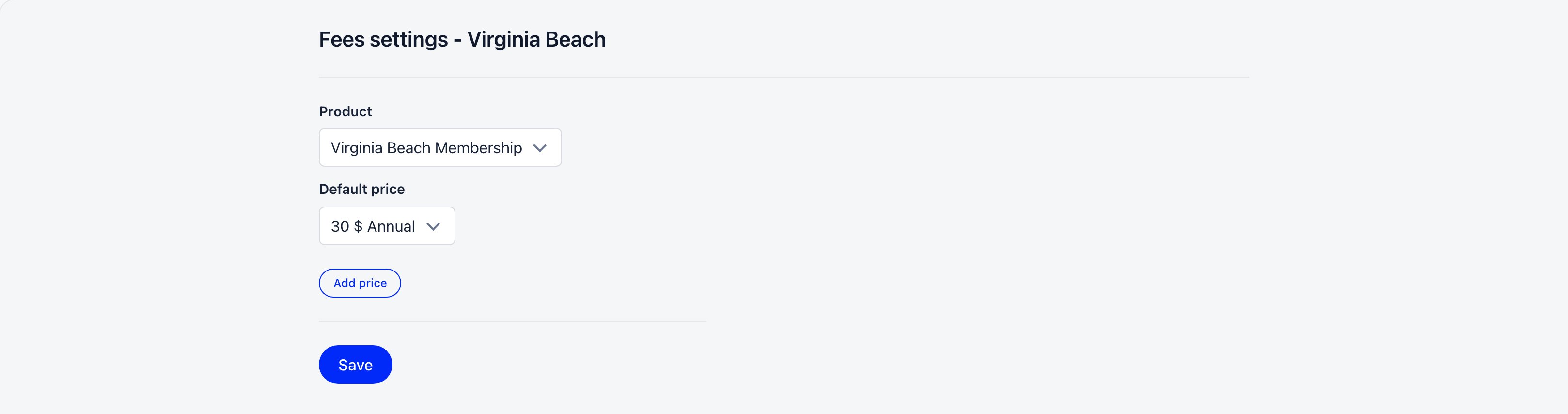
Select Product and Default price, then Save
Product lists only products belonging to this chapter. Default price lists that product’s non-archived prices with their amount and the organisation currency symbol.
5
Connect the chapter's Stripe account (optional)
Without one, chapter fee charges fall back to the organisation’s Stripe account. See Stripe Integration.
The chapter settings sidebar shows Fees settings to
FINANCIAL_LOCAL, but the screen behind it needs ADMIN_LOCAL. A finance-only chapter admin will see the entry and land on an empty page.What the default price does
The default price is not just a suggestion. Whenever the Member fees table or a member’s fee view loads, every fee-eligible member of the chapter who has no chapter fee tier yet is given the chapter’s Default price. With Enable Age Restrictions on Prices on, the age-appropriate variant of that price is chosen instead. Change an individual member’s tier from the Member fees table, or from the member’s Fee tab (needsFINANCIAL_LOCAL on their chapter, or the member changing their own).
How a member pays both fees
A member’s profile Fee tab shows two cards side by side, Organisation fee and Local fee. The local card only appears when chapter fees are on, the member’s chapter has a fee product, and the member has a chapter fee tier.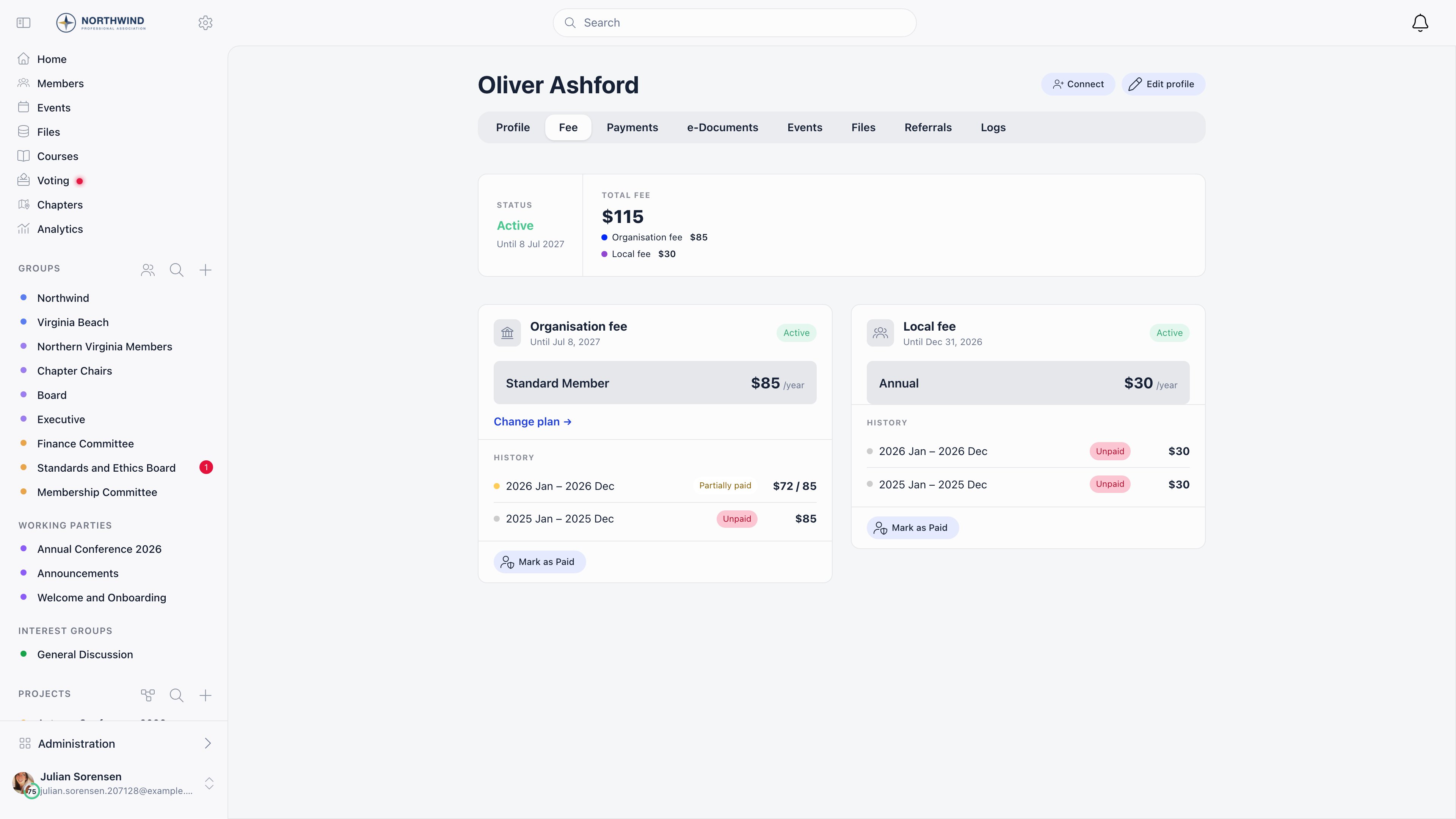
- The chapter fee charge is routed to the chapter’s own Stripe account when it has one, otherwise to the organisation account.
- The amount is charged in the chapter’s currency when the chapter has its own currency override, otherwise in the organisation currency.
- The one-time registration fee is organisation-level only. It is never added to a chapter fee.
- The local fee card offers one-off payment only. Recurring subscriptions are not available for chapter fees.
- Members can start a chapter fee payment for themselves only. Admins record payments on a member’s behalf instead of paying for them.
Fee validity
Paying the chapter fee stamps a billing period and sets the member’s chapter fee validity date to the end of that period. It is stored and evaluated separately from the organisation fee validity date, so a member can be current on one and expired on the other. A lifetime price with no amount sets the date 100 years out.Recording offline payments
Cash and bank transfers collected by the chapter are recorded in the Member fees table, which stages the amounts as a draft and then writes them as one pending fee payment batch for an organisation admin to approve. Settling a single member instead, with Mark as paid on their profile’s Fee tab, needs no approval: that batch is written as already approved and the validity date moves at once. See Recording a payment.Who can do what
Troubleshooting
The Product dropdown is empty on Fees settings
The Product dropdown is empty on Fees settings
It lists only products that belong to this chapter. A product created by a
FINANCIAL_TENANT user is an organisation product and will not appear. Create the product from the chapter’s Fees settings so it is stamped with the chapter.Members of the chapter have no local fee showing
Members of the chapter have no local fee showing
Check that the chapter has both a Product and a Default price saved, that the member is fee eligible, and that their member type is not flagged as not eligible for fees. Members with no chapter fee tier get one assigned automatically the next time the fee views load.
Chapter fee money is landing in the organisation account
Chapter fee money is landing in the organisation account
That chapter has not connected its own Stripe account. Charges fall back to the organisation account by design until it does.
The chapter's IBAN is not on any invoice
The chapter's IBAN is not on any invoice
The IBAN fields on a chapter record are reference details. The native-currency one is shown on the chapter’s info page under Legal details, but bank-transfer invoices and PDF payment proofs use the organisation IBAN.
Related
- Member fees table: recording chapter payments member by member
- Membership Fees: the organisation-level fee and its settings
- Products: fee products, prices and tiers
- Stripe Integration: chapter Stripe accounts and currency rules
- Chapters: chapter records, settings sidebar and waitlist