

A contact can never hold a membership fee
The practical consequence is simple. If you need any of the following for a person, that person has to be a member, not a contact:- a membership validity date and an active or lapsed status
- the renewal ladder and its reminder emails
- membership inherited from a company
- inclusion in the paying-members figures on Insights
Do not sell a membership fee product to an address that is not a member. A fee
purchase made from an email Orgo cannot match to a member does not become a fee
record. Take fee money through the member’s own account, or use Mark as paid
on their Fee tab. See Recording a payment made outside Orgo.
Money follows the email
Every checkout in Orgo resolves its payer the same way, whether it is a donation page, an event ticket, an invoice or a Stripe charge.1
Look for a member
The payer’s email is matched against members in your organisation. A match
books the payment to that member.
2
Otherwise look for a contact
No member match, so Orgo looks for a contact with that email in your
organisation.
3
Otherwise create one
No contact either, so a contact is created there and then, stamped with the
source that produced it (Donation, Event or Stripe), and the money is booked
against it.
What a contact can pay for
Where a contact’s money shows up
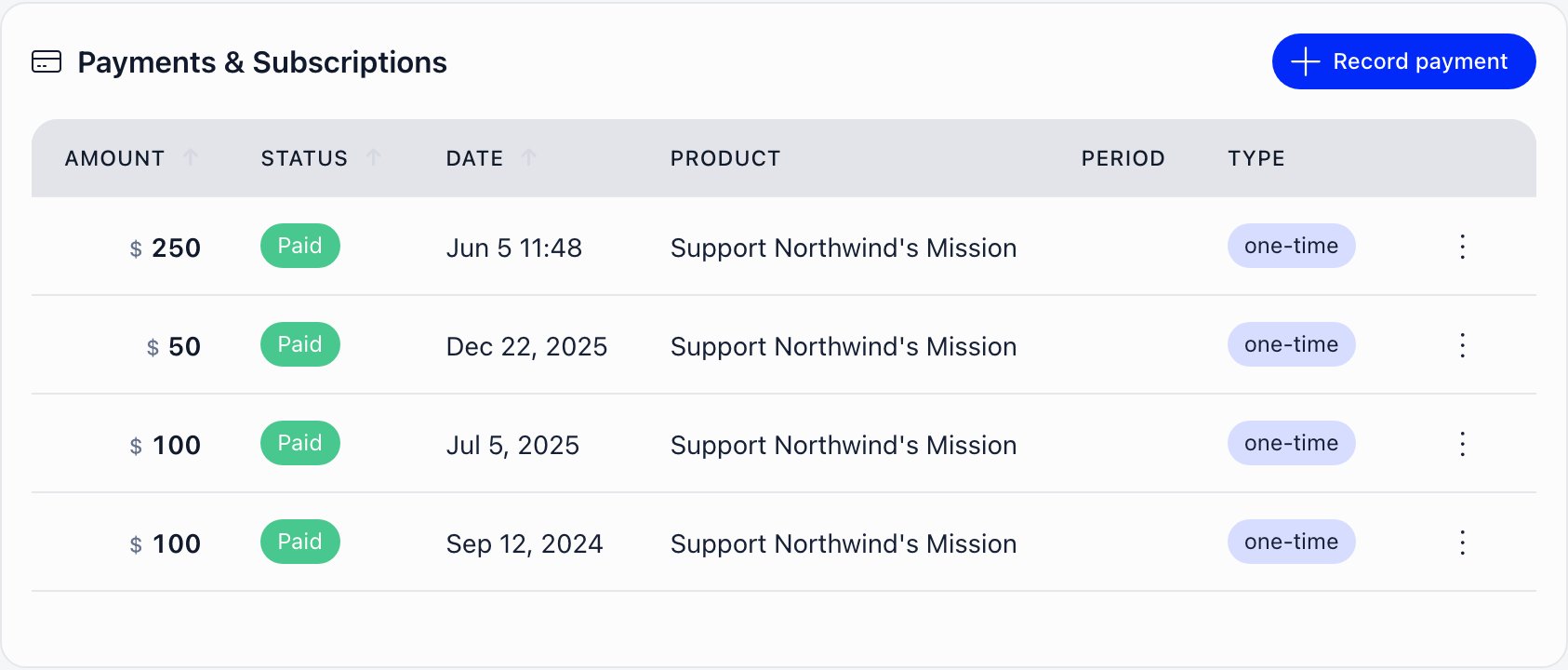
On the contact record. The Payments & Subscriptions card holds a subscriptions table and the same payments table used on member profiles, plus a Record payment button for money taken offline. In your organisation-wide lists. A contact payer appears in the payments list and in the invoice list exactly like a member, shown as a link back to the contact record rather than to a member profile. Permissions differ by action, and the server enforces them regardless of what a screen shows you.
A chapter-level financial or HR permission on its own is not enough to open a
contact’s payment history. That list is an organisation-level view.
A contact with any payment, invoice or signed document attached cannot be
deleted, individually or through bulk delete. The money records would be left
without a payer.
Recurring payments by a contact
Recurring works. A contact can hold a subscription, the card is charged every period, and each charge is written as a payment against the contact and shows on their record. Plan for that. Say on the donation page how often the card will be charged and how to stop it, and check the subscriptions on the contact record when someone queries a charge they did not expect.Company membership
A contact can be added to a company and given any of the company roles, including Primary Contact, and can carry a joined date. They appear in the company’s Team Members panel and link back to the contact record. A contact consumes one of the company’s seats. The seat allowance comes from the plan the company bought, and a contact row counts against it in the same way a member row does. What a contact does not get from the company:- Membership validity. When the company pays, its valid-until date is copied to members who have an account. A contact has no fee date to receive, so it is skipped. A contact inside a fully paid-up company is still a non-member.
- Any company power. Roles held by a contact are stored and displayed but grant nothing, because company permissions are exercised by signing in and a contact cannot sign in. A contact who is the Primary Contact cannot administer the company, edit it, or manage its payments.
Refunds
Refunding a contact’s payment is the same job as refunding a member’s, with the same button, the same permission and the same result. The money goes back through Stripe, the payment is marked refunded, and any event tickets bought with it are cancelled so the places return to sale. The only difference is what a refund unwinds afterwards. A member refund rolls their membership validity date back. A contact has no validity date, so there is nothing to roll back and nothing happens. A refund on a contact-payer invoice marks the payment refunded and stops there.Reporting: the figure that misleads
This one costs people a board meeting.- Revenue totals include money paid by contacts. Every successful payment counts, whoever paid it.
- The paying-members count does not. It counts members with a membership fee period covering the date being reported. Contacts are excluded, and so is every purchase that is not a membership fee.
Troubleshooting
A payment shows against a contact instead of the member
A payment shows against a contact instead of the member
The payer used an email address that does not match their member record, so
the member lookup missed and a contact was found or created instead. The
payment stays where it was booked. Merging that contact into the member moves
their payments, subscriptions, invoices and identity records across.
Create user account may do the same thing, but only when your
organization creates admin-made accounts as Active, which is the default. On
that setting the matching contact is folded into the new member and removed.
On any other setting the contact is left behind with the money still on it.
Merge is the reliable route, because it shows you what will move before you
commit and can be undone. See
Becoming a member.
Someone paid but still has no membership
Someone paid but still has no membership
Check whether the payer is a member or a contact. A payment booked to a
contact never produces membership validity, whatever was bought. If they
should be a member, make them one and record the fee on their Fee tab.
A company seat is taken by someone who cannot be removed
A company seat is taken by someone who cannot be removed
Contact rows in a company count toward the seat allowance, and the Remove
and role controls on the Team Members panel act on member rows. If the
company needs more room, the seat count comes from the plan it bought, so a
plan with more slots raises the allowance.
A contact's subscription renewed and nobody was told
A contact's subscription renewed and nobody was told
Expected behaviour. Renewal notices are sent for member-owned subscriptions.
The charge itself is recorded normally and appears on the contact record.
Every anonymous payment creates a new blank contact
Every anonymous payment creates a new blank contact
A payer who completes checkout without giving an email cannot be matched to
anything, so a fresh contact with no name and no email is created for each
payment. Ask for an email on the checkout if you want payers to accumulate on
one record.
Related
- Contacts what a contact is and how the module is switched on
- Becoming a member merging a contact into a member and what moves
- Contacts and events tickets, attendance and the event app
- Donations donation pages, one-off and recurring giving
- Stripe integration taking card payments online
- Invoices raising and settling invoices
- Recording a payment made outside Orgo bank transfer, cash and cheque
- Membership fees how fee periods and validity dates work
- Companies corporate membership, seats and inherited validity