

This is the opposite direction from OAuth Server, which lets people sign in to your apps with their Orgo account. This page is about signing in to Orgo with an account from your provider.It is also not the same as the Google, Microsoft and Apple buttons described under Integrations. Those are Orgo’s own social sign-in, they need no setup, and they cannot be required.
Before you start
The feature is switched on per organization by Orgo. Until it is, the screen says “Sign-in with your own identity provider is not enabled for your organisation yet. Contact Orgo support to turn it on.” Once Orgo has enabled it, turn it on yourself at Integrations → Single Sign-On. Then the setup screen lives at Settings → Single sign-on. Both need the Orgo administrator flag, not just an admin permission: see Permissions. You will also need access to your identity provider’s admin console, and the ability to publish a DNS record for your email domain.Setting it up
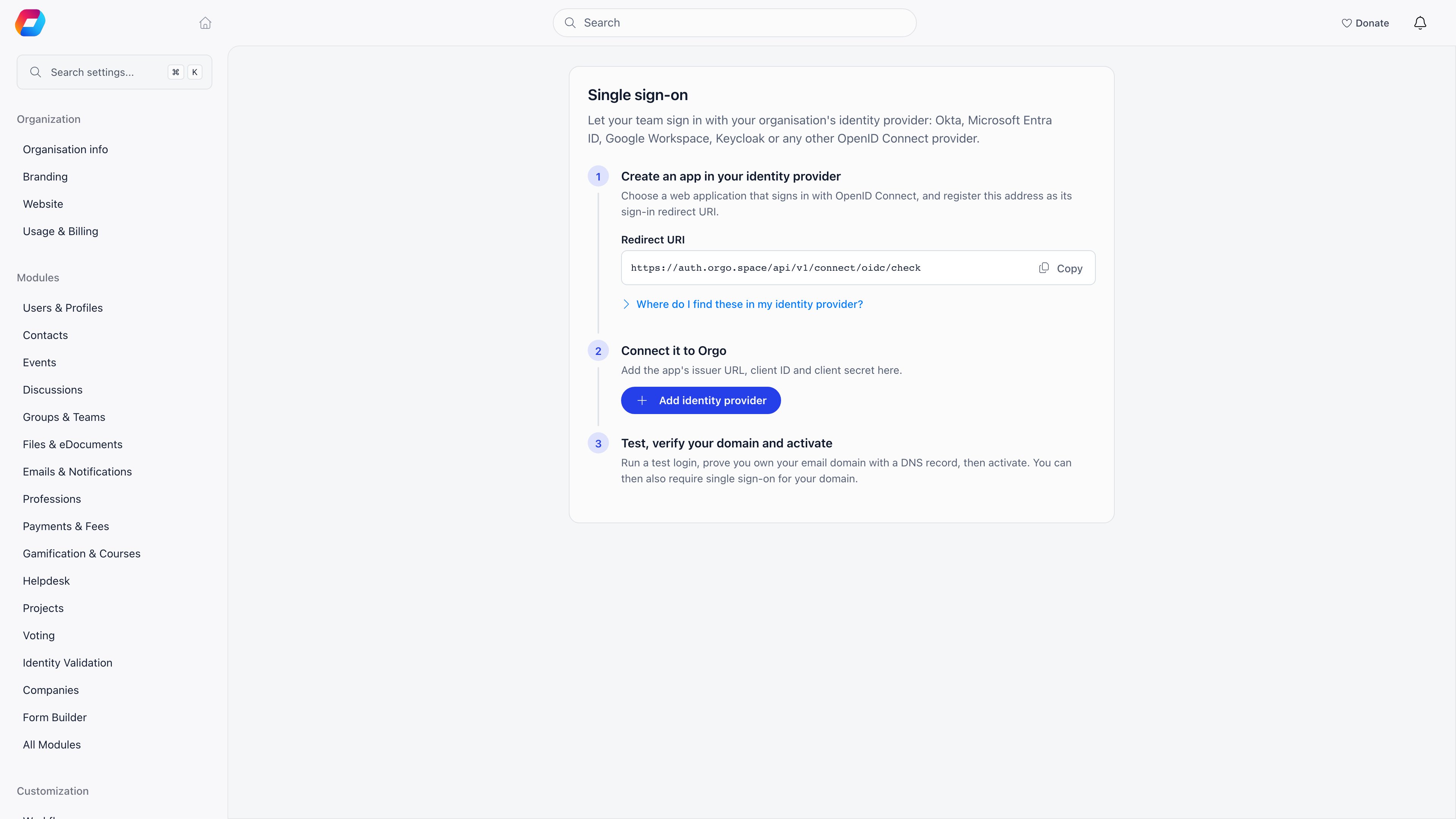
1
Create an app in your identity provider
Create a web application that signs in with OpenID Connect, using the authorization code flow, and register Orgo’s Redirect URI as its sign-in redirect URI. The screen shows the exact address with a copy button.Pick your provider on the setup screen and it tells you where each value lives in that provider’s console:
2
Connect it to Orgo
Choose Add identity provider and fill in:
3
Run a test login
Test login is required before you can activate, and it tells you exactly what would happen:
- Signs in as (member), when your account is already linked.
- Will be linked to (member) on the first real sign-in, when it matches an existing Orgo account by email.
- The connection works, but this account would not be signed in, with the reason. Usually this means the account does not exist in Orgo and account creation is off.
4
Verify your email domain
Add each email domain this provider signs people in for, then prove you own it by publishing the TXT record Orgo shows at your DNS provider. Use Check now after publishing. DNS changes can take a few minutes, and the domain sits at Pending until the record is found, then moves to Verified.
5
Activate
Activate makes the “Continue with …” button appear on your login page. Members can now choose it, while every existing way of signing in still works.
Requiring single sign-on
Activating a connection only offers it. Require single sign-on, set per verified domain, makes it the only way in for everyone with an email address on that domain. Before you can switch it on, you must have signed in to Orgo through that provider yourself at least once. That is deliberate: it proves the connection works for a real person before it becomes mandatory. A member who hits a sign-in path that is no longer allowed is refused with a message telling them to use single sign-on, rather than being told their password is wrong. This covers every route in: password, email code, multi-factor prompts, password reset, the Google, Microsoft and Apple buttons, the mobile apps, and the event app.Day to day
Each connection shows its Linked members count and when it was Last tested.
Shortening the session lifetime is the fastest way to make removing someone in your identity provider take effect in Orgo, since the next session renewal sends them back through the provider.
Troubleshooting
The screen says the feature is not enabled for us
The screen says the feature is not enabled for us
Orgo switches this on per organization. Contact support. Once they have, you still need to turn it on yourself at Integrations → Single Sign-On.
Activate is greyed out
Activate is greyed out
Run Test login first. A connection cannot be activated until a test has passed, so that a broken issuer or secret is caught before anyone relies on it.
Require single sign-on is greyed out
Require single sign-on is greyed out
You have to sign in to Orgo through the provider yourself before you can require it. Sign out, choose the “Continue with …” button, sign back in, and the option becomes available.
The domain stays Pending
The domain stays Pending
The TXT record has not been found yet. Check it is published on the exact domain shown, then use Check now. DNS changes can take a few minutes to propagate.
A test login says the account would not be signed in
A test login says the account would not be signed in
The email from your provider does not match an Orgo account and Create accounts on first sign-in is off. Either add the person to Orgo first, or turn account creation on, which requires a verified email domain.
Our provider broke and nobody can sign in
Our provider broke and nobody can sign in
If you only activated the connection, members can still use password, email code or social sign-in, so disable the connection and carry on.If you required single sign-on for the domain, those routes are closed and only Orgo support can lift the requirement. Contact support.
A member signs in but lands in the wrong account
A member signs in but lands in the wrong account
Linking matches on email address, and only on an exact match. If someone has two Orgo accounts, or their provider email differs from the address on their Orgo profile, correct the profile email first. See Merging Duplicates.
Related
- Integrations - the switch that turns this on, and Orgo’s own Google, Microsoft and Apple sign-in
- OAuth Server - the other direction, signing in to your apps with an Orgo account
- Permissions - why this screen needs the Orgo administrator flag
- Troubleshooting Access - when a member cannot sign in at all
- Custom Domain - the address members sign in at