

Issues, tasks or the help desk
Creating a project group
Issues are not available on ordinary groups. You need a project group, and the Project Management module has to be on: Settings → Modules → Projects → Enable Project Management (needsADMIN_TENANT).
On the Issues page, a member who belongs to no project yet is offered Projects → New,
which creates a group in project mode. Who may create one follows the tenant’s
group-creation setting (Settings → Modules → Groups & Teams). Once the group exists,
open it and pick the Issues tab.
A new project group starts with:
Both lists are editable afterwards. Open the group, choose Settings from its menu
(
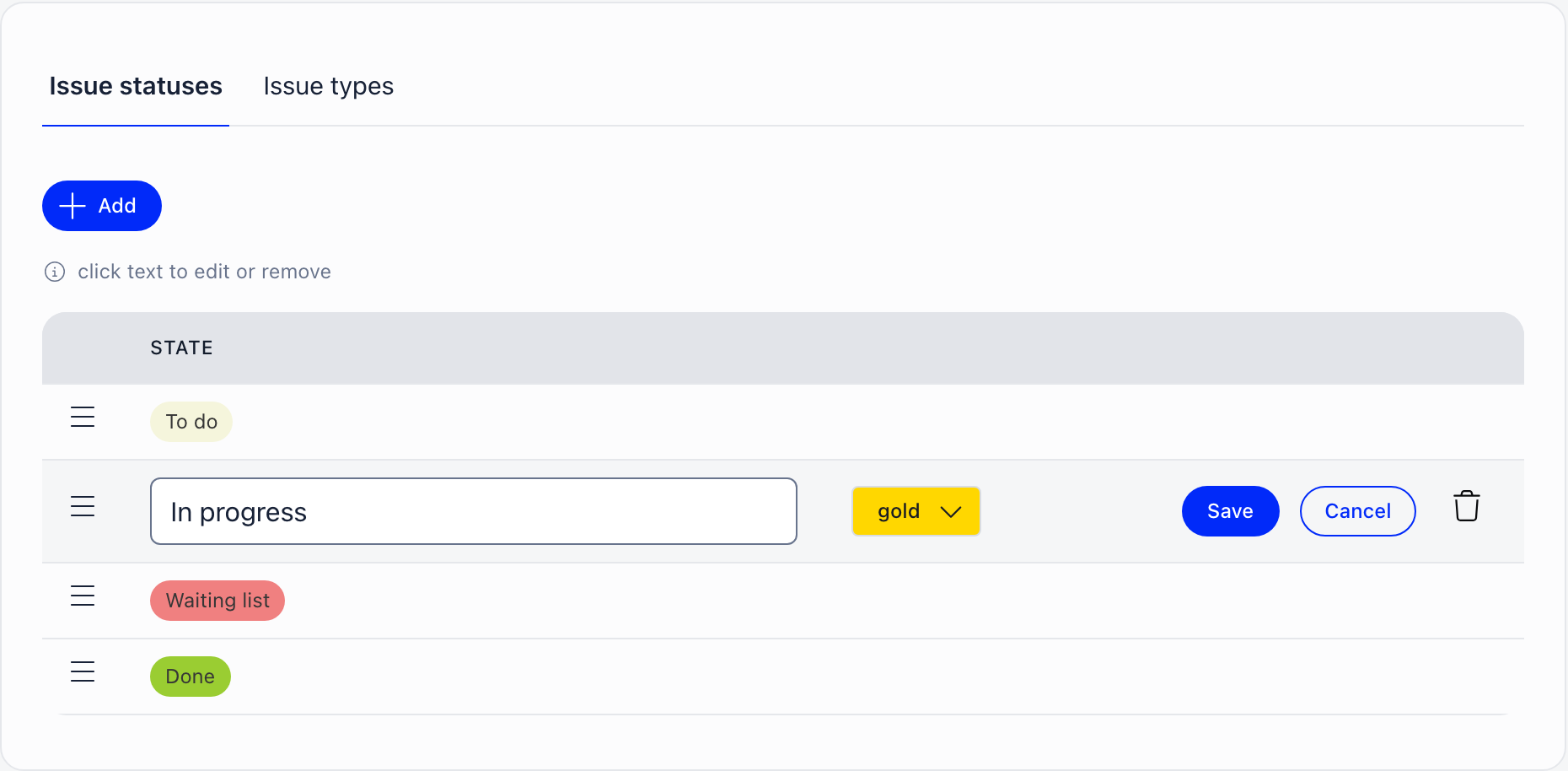
/group/edit/{id}, group owner or group admin), and the Issue statuses and Issue
types tabs sit under the group form. Add creates an entry, clicking a name opens it for
renaming, the colour button beside it sets its colour, dragging a row reorders it on desktop,
and the bin deletes it. The pencil beside Type and Status in the issue form is a
shortcut to the same screen.
Who sees what
Issues are visible to members of the group they belong to, and to nobody else. That check runs on the server, not just in the interface, so an issue in a private working group stays inside it. Anyone who can open a project board can add an issue to it and edit the issues on it.Adding an issue
Click Add issue on the board. The form asks for:
Mentioning someone in the description notifies them. The author follows the issue
automatically and is notified of every comment.
The board
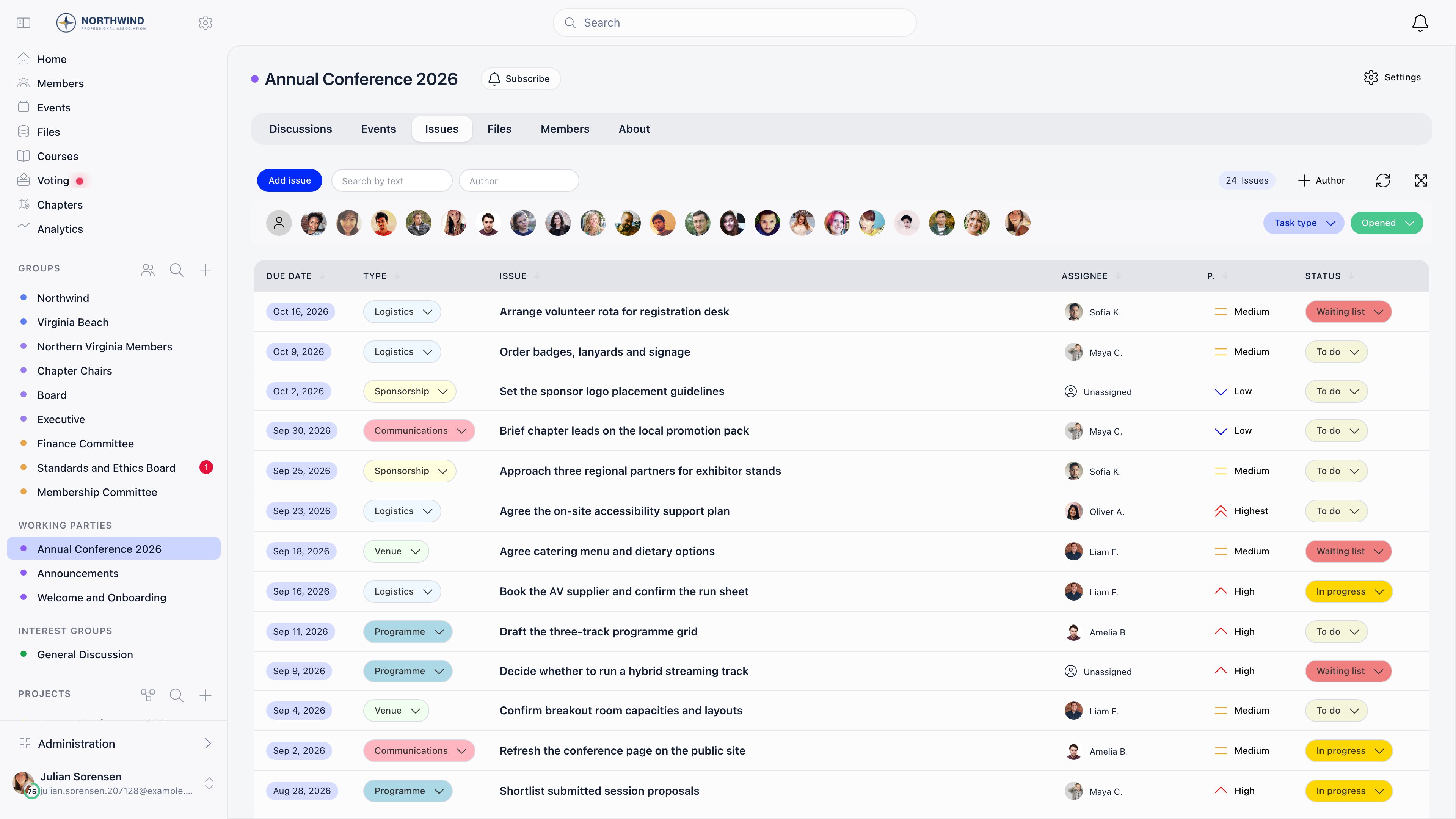
The board is a sortable list. Columns: due date where enabled, type, title, assignee, priority and status, plus a created-date-and-author column that the author button in the toolbar shows or hides. Type, status, assignee and priority can all be changed inline from the list. Filters sit above the list:- free-text search over the title
- Task type
- status: Opened (the default), any individual status, or Closed
- assignee avatars, including unassigned
- your own avatar, which filters to issues that mention you
- an Author search, to see one person’s issues
Closing an issue
Set the status dropdown to Close. Two variants:- Close archives the issue immediately and clears its status.
- Close and comment opens a box for a closing note, then archives it.
Comments and attachments
Every issue has a thread. Comments support rich text, images, video and file attachments, and mentions. Following an issue happens automatically when you create or comment on one.Who gets notified
Changing status, type, priority or due date notifies nobody, and there is no reminder when
a due date approaches. If you need due-date reminders, use tasks.
Common questions
My group has no Issues tab
My group has no Issues tab
The tab only appears on groups created in project mode, and only for members of the group. An ordinary group cannot be converted afterwards.
I want different statuses for this project
I want different statuses for this project
Rename, recolour, reorder or delete them on the group’s Settings screen, under Issue statuses, and add your own with Add. Statuses are per group, so changing them here affects only this project.
Where is the kanban board?
Where is the kanban board?
There is no kanban view. The board is a sortable list, with drag-and-drop reordering when you sort by priority.
Can an issue belong to two groups?
Can an issue belong to two groups?
No. An issue belongs to exactly one project group. Work that spans teams needs a shared group, or a project.
Due dates are not showing
Due dates are not showing
The due-date field is off for project groups by default and there is no screen to switch it on. Projects and tasks carry due dates as standard.
Related
- Help Desk - the same board for member support requests
- Projects - the fuller project workspace with editable workflows
- Tasks - task assignment, due dates and reminder digests
- Groups - where project groups are created and managed
- Notifications - controlling what reaches you