

Use the organization space for the default feed. Create auto-enroll groups when you want more than one all-hands channel, for example a locked-down Announcements group alongside an open General Discussion group.
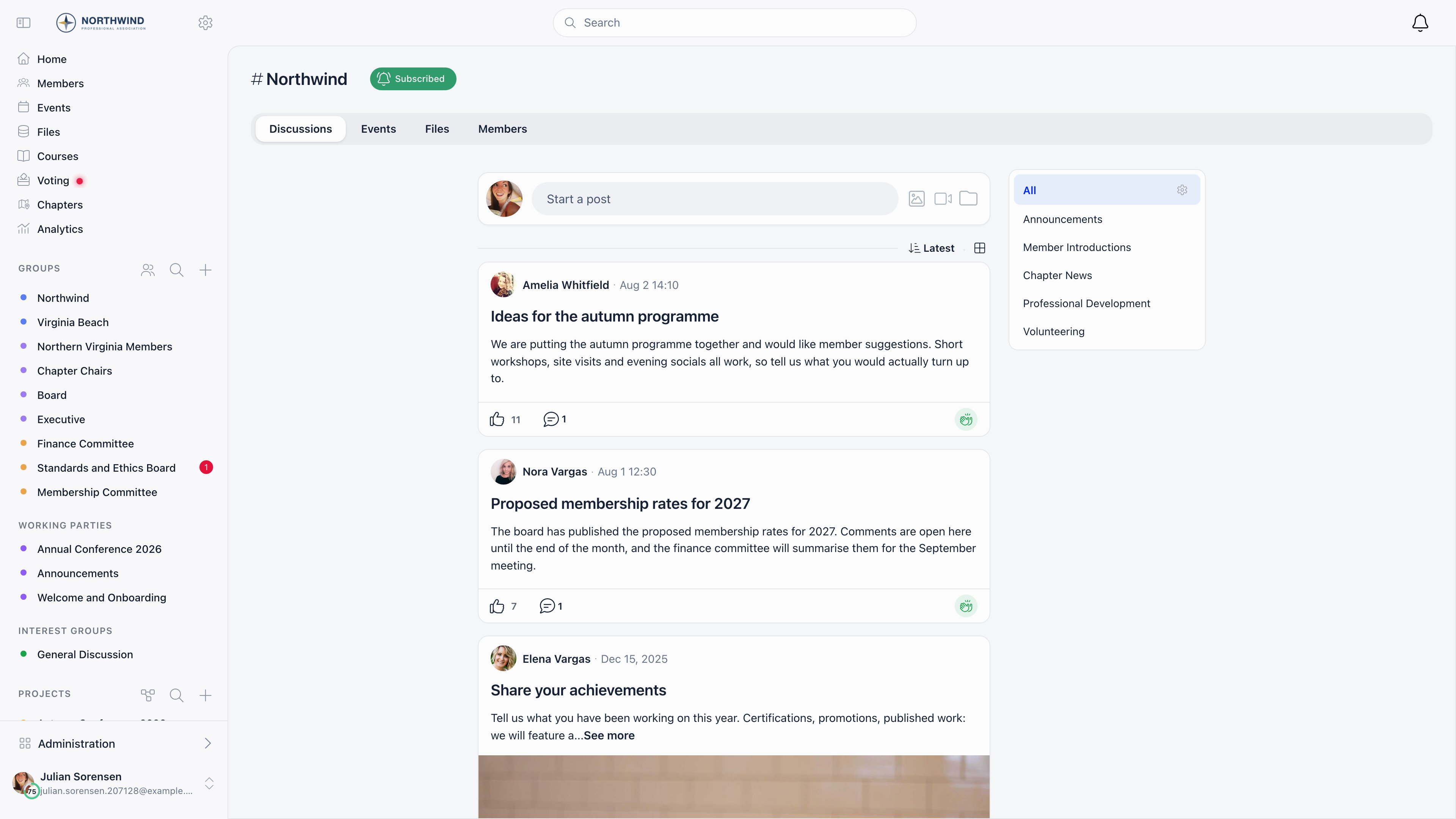
The organization space
How to reach it
Click your organization’s name at the top of the sidebar, or open the first card on the Groups page. The sidebar keeps it visible even when the Groups section is collapsed.What it contains
The same tabs as any other space, subject to which modules are on:
Unlike a group, the organization space does not turn discussion categories into extra tabs. Organization-wide categories still apply here: they appear as a filter list beside the feed, with a gear icon for managing them.
Who can see the member directory
Settings → Users & Profiles → Permissions setup → Users Module → Who can see members in general unit group. Set it to the minimum permission a member needs to open the Members tab here. Members holdingHR_TENANT or FINANCIAL_TENANT always see it.
Notifications
Each member controls their own subscription with the Subscribe / Subscribed button on the organization card. Turning it off stops notifications; it does not remove them from the space, and nothing about their access changes.The organization space is not a group record. It cannot be renamed, archived, deleted, or given its own posting rules. To control who can post organization-wide, use an auto-enroll group instead.
Building an all-members group
An auto-enroll group behaves like the organization space but is a real group, so you can name it, give it a logo and emoji, restrict posting and archive it later.1
Create the group
Groups → Create group. You need
ADMIN_TENANT.2
Set Access to Auto-enroll all members
The description under the option reads “Add all members automatically”. Every active member of your organization is included, and none of them can leave.
3
Pick the features
Turn on Discussions, Files and Events as needed. At least one has to stay on.
4
Set Who can post?
Only admins turns the group into an announcement channel. Everyone in the group keeps it open.
5
Save
The group appears immediately under Community groups for every member.
Common scenarios
The organization feed is too noisy
The organization feed is too noisy
You cannot restrict posting on the organization space itself. Create an auto-enroll group with Who can post? set to Only admins and direct announcements there, leaving the organization space for open conversation.
Can I turn the organization space off?
Can I turn the organization space off?
No. The All Members Group switch in Settings → Groups & Teams → Configuration looks like it does this, but nothing reads that setting and toggling it changes nothing.
A member says they stopped getting notifications
A member says they stopped getting notifications
Check the Subscribe button on the organization card on their Groups page. Anyone can unsubscribe themselves, which silences notifications without affecting access.
I want discussions organized by topic
I want discussions organized by topic
Enable discussion categories. Created on a group, they render as extra tabs inside that group. Created organization-wide, they apply to the organization space, where they appear as a filter list beside the feed rather than as tabs.
Related
- Groups & Teams - all access modes and when to use each
- Private Groups - committees and project teams
- Role Groups - criteria-based automatic membership
- Local Centers - geographic branches
- Discussions - the discussion feed