

Requires ADMIN_TENANT. There is no local-admin view of the tenant-wide log, and the same permission gates the log tabs that appear on individual records.
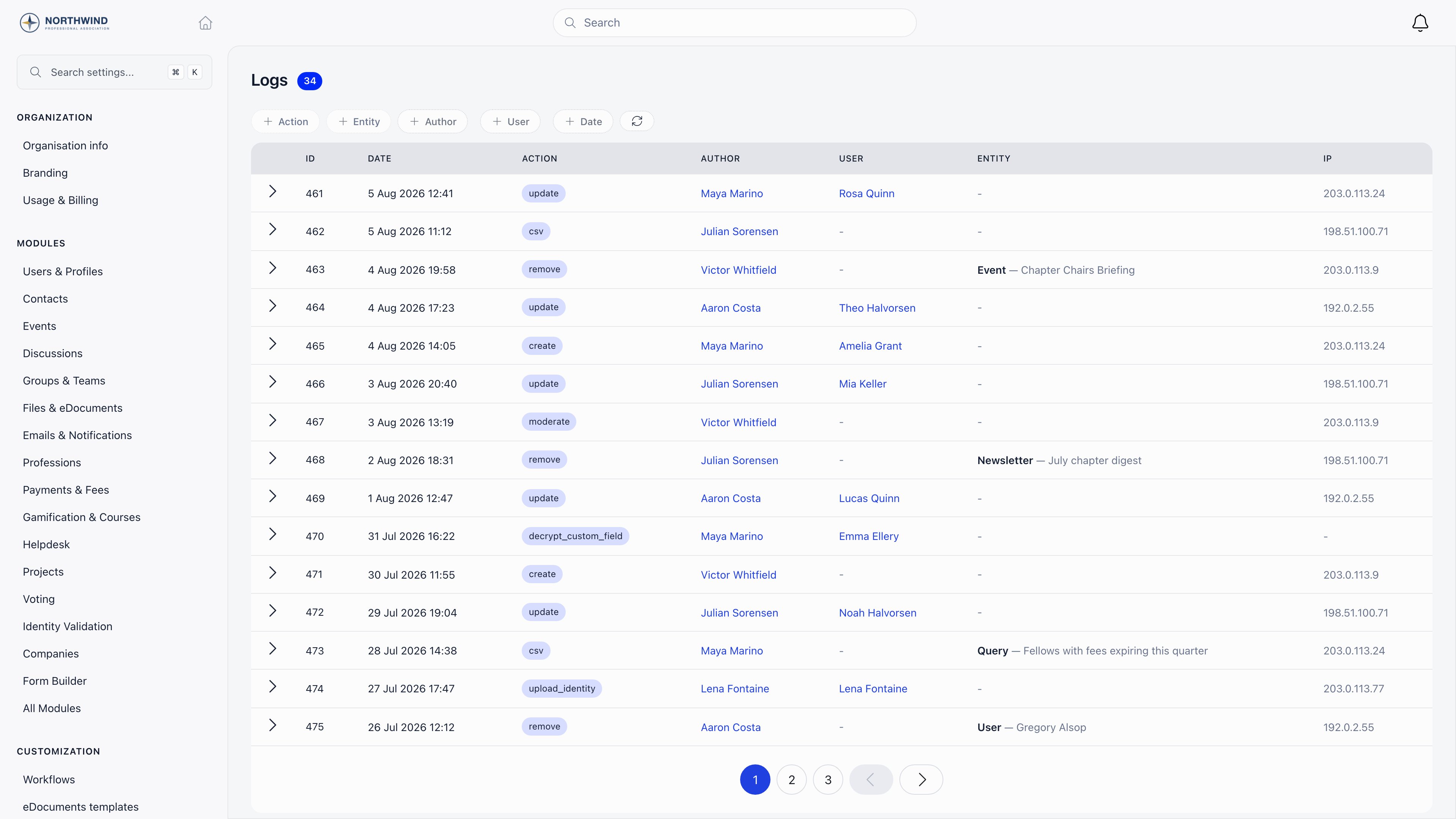
Reading an entry
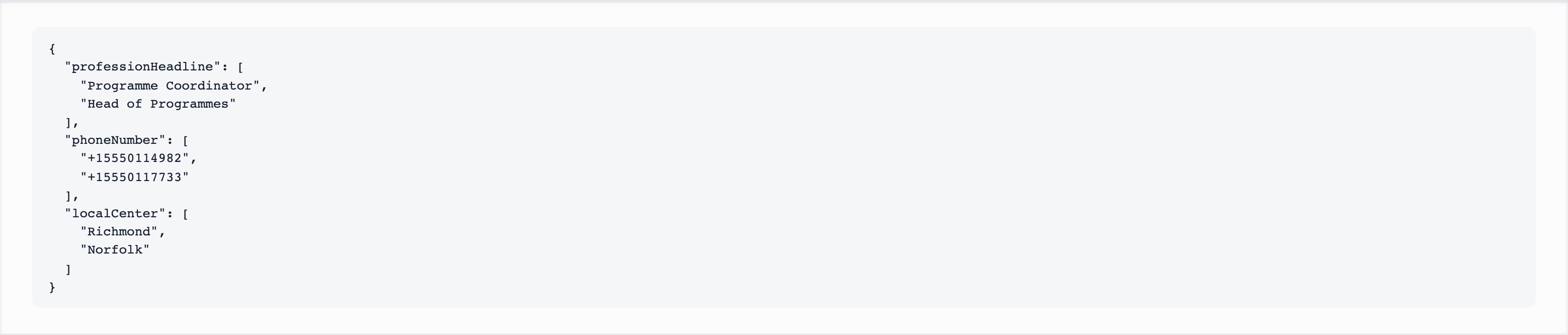
Click the arrow at the start of a row to expand the details. For an edit, the details show only the fields that actually changed, each with its old and new value. Fields whose value did not really change are dropped before storage, as is the automatic “last updated” timestamp, so the detail block is the real diff rather than a dump of the whole record. For a deletion, the details hold a snapshot of the key fields as they were just before the record went away.
Entries are 15 to a page, newest first.
Filtering
The pills above the table combine, and the result is written into the page URL, so a filtered view can be bookmarked or pasted to a colleague.
Refresh re-runs the current filter.
Searching the text of entries
The tenant-wide page has no free-text box. Two other places do:- A member’s profile. Open the member, then More → Audit Logs (the More menu sits at the end of the profile’s tab row). The Search action, details or author box shows only that member’s entries that contain what you type. It looks in the action name, in the recorded details (the field names and values that changed) and in the author’s first and last name. It is not case sensitive and matches part of a word, so
emailfinds changes to an email field andMariafinds everything Maria did. Field names are stored in camel case (firstName, not “first name”), so search for the stored spelling or a fragment of it. It needs at least 2 characters; with fewer the list is not filtered. The list updates a moment after you stop typing. - The API.
GET /logs?keyword=<text>applies the same search. It is combined with the filters you already use (user,action,entityType, dates) and can only narrow the result, never widen it, so it cannot return an entry you could not list without it. Like the page, it needs ADMIN_TENANT.
What gets recorded
Record merges are logged too, but they are not offered in the Action filter. Review them on the merge history page instead.
What is not recorded here
- Logins are not in this log.
- Email delivery is not in this log. Use the email log.
- Webhook deliveries have their own log on each webhook subscription.
- Imports report per-row results on the import itself, not here.
- Changes made without a signed-in account produce no entry. A visitor registering for a public event, for example, creates the attendance but no log row, because there is nobody to attribute it to.
The Entity filter is narrower than the table
The Entity column and filter are populated for deletions and for saved-query exports. Most edit entries identify their subject through the User column instead and carry no entity type, so filtering by, say,User will not return profile edits. To review edits to one member, filter by User, or open that member’s profile and use its own log tab.
The filter dropdown is also a fixed list, and it is shorter than the set of entity types the table displays. Tag changes (ProfileTag) and note deletions (UserNote, ContactNote) write rows that show their type in the Entity column but have no option in the filter, so they cannot be narrowed down that way. Filter by User and Action instead, or read them in order on that person’s Activity tab.
The IP and impersonation columns
The IP address is captured from the browser request that made the change, so entries written from an asynchronous handler rather than directly from the request carry no IP in that column. Encrypted custom field reads are the notable case: they are recorded asynchronously, and their IP is stored inside the details block instead. Deletion entries also record an impersonator when the deletion happened while an administrator was viewing the platform as another user. That tells you the account the action was attributed to and the account that actually performed it.The same log, scoped to one record
The tenant-wide page is not the only way in. The same entries appear filtered on:- a member profile, under More → Audit Logs: a table with ID, Date, Action, Changes and Author, plus the search box described above. Changes names the field that changed, and “+2” after it means two more fields changed in the same edit. Click a row to open the entry: a window with one line per field, showing Field, Value before and Value after;
- an event attendance, on the attendees screen;
- an adhesion, on its log view.
Retention and export
Entries are kept for as long as your organization exists. Nothing prunes them on a schedule, and deleting your organization removes them along with everything else. The log is strictly read-only: entries cannot be edited or deleted from the interface, and there is no endpoint that would let anyone do so. There is no export button on this page; if you need the entries outside Orgo, read them through the API.Troubleshooting
A change I know happened is not in the log
A change I know happened is not in the log
Three common reasons. It was a cascade or a background job, which are not logged per record. It was a kind of change that has no log action at all (see the table above; not every screen writes an entry). Or the Entity filter is hiding it, because edits generally carry no entity type: clear the filters and narrow by User and date instead.
The IP column is empty on some rows
The IP column is empty on some rows
The address is taken from the browser request that made the change. Entries written from an asynchronous handler rather than directly from the request, such as reading an encrypted custom field, carry no IP. The author is still recorded.
I need to know who deleted a member
I need to know who deleted a member
Filter Action = remove and Entity = User, then expand the row. The snapshot holds the email, first and last name and status the account had at deletion, and the Author column names who did it.
How do I find every change made by one person, or every change to one field?
How do I find every change made by one person, or every change to one field?
On the member’s profile, More → Audit Logs, type the person’s name (for the author) or the field name (for example
email) into Search action, details or author. For the whole organisation, filter the tenant-wide page by Author and Action; field names can only be searched per member or through GET /logs?keyword=.The log search finds nothing
The log search finds nothing
Use at least 2 characters (shorter text is ignored and the full list shows). The search covers the action, the details and the author’s name, Details are stored as raw field names and values, so search for the stored spelling, for example
firstName rather than “first name”.A local admin says the log is empty for them
A local admin says the log is empty for them
It is not visible to them. The log requires ADMIN_TENANT, and that includes the log tabs on individual profiles.
Who read an encrypted custom field?
Who read an encrypted custom field?
Filter Action = decrypt_custom_field. Failed attempts are recorded separately as decrypt_custom_field_failed, and switching encryption on or off for a field is recorded as its own action.