

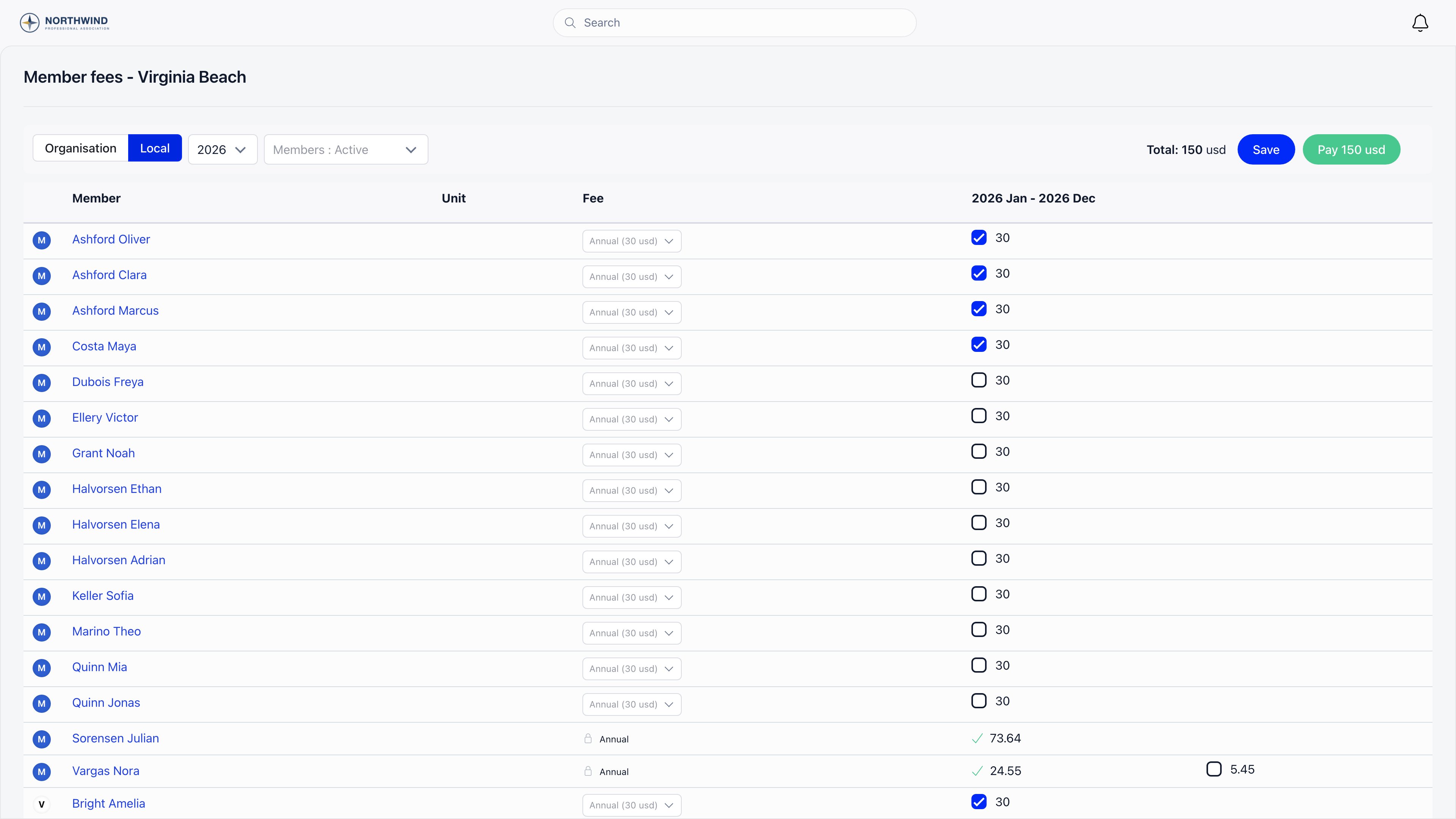
Getting there
The table needs Local Center Members Table on under Settings → Payments & Fees → Membership fees, plus eitherFINANCIAL_LOCAL on the chapter or an active unit-admin role inside it.
Chapter admins always land on their own chapter. An organisation admin can open any chapter, and everything they then stage or record is anchored to the chapter they are viewing, not to their own.
Reading the table
Each period cell shows a green tick with the amount when the period is paid, an orange tick while a payment is still processing, and a checkbox with the outstanding amount when it is not. Partly covered periods show one checkbox per missing slice, so proration is preserved.
Above the table: the Organisation / Local toggle (only when chapter fees are on and the chapter has a fee product), the fee year, a member status filter (Active, Inactive, Suspended, plus any of Awaiting referral, Excluded, Helping hands or Contributor your organisation uses), and a unit filter with All units and No unit.
A member with active roles in more than one sub-unit is still listed under a single unit. Orgo picks the unit where they hold plain membership ahead of any unit where they are a unit administrator or hold a role that carries permissions, so a leadership position elsewhere does not pull someone out of the unit they are registered in. A member whose only role is a leadership one is listed under that unit. Where that still leaves a tie, the first unit by name wins. The Unit column, the unit filter and the unit recorded against payments you take here all follow the same choice.
The table only shows payments made through this chapter. A member’s full fee history, including payments recorded elsewhere, lives on their profile’s Fees tab.
Changing a member’s tier
The Fee column is a dropdown of the fee product’s prices. Picking a new one applies from the start of the fee cycle you are currently viewing, so setting next year’s tier does not rewrite this year’s. The dropdown is replaced by a padlock and the tier name once a successful payment covers the viewed cycle or a later one. Trying anyway is refused with The fee is already paid and can no longer be changed.Recording a payment
1
Tick the periods collected
The running Total above the table adds up everything ticked, in the chapter’s currency.
2
Save (optional)
Save stores what you ticked as a draft, so the selection survives leaving the page. The draft is shared across the chapter’s fee admins, and each admin sees only the members they are allowed to manage.
3
Pay
Pay [total] writes one fee payment batch covering every ticked period and takes you to Finance → Fee payments. The batch is stamped with the bank transfer (
iban) method and starts as pending.4
Approve
On Fee payments, Approve marks the batch and every payment inside it successful, then recalculates each member’s fee validity date, chapter validity for chapter fee products and organisation validity otherwise. Approve is offered to
ADMIN_TENANT only. A pending batch can instead be removed with Cancel, which needs ADMIN_LOCAL and deletes the batch and its payment rows.Unit admins
A member with an active admin role on a unit reaches this table without chapter-level finance rights. They see and manage only members holding an active role in their admin units or any unit below them. Staging and recording are filtered the same way on the server, so one unit’s treasurer can neither see nor overwrite another’s rows. Their Fee payments list opens on the Local tab, which is where the payments they record appear.Troubleshooting
The Organisation / Local toggle is missing
The Organisation / Local toggle is missing
Either Local Center Fees Enabled is off, or this chapter has no fee product selected in its Fees settings.
A member has no checkbox on an unpaid period
A member has no checkbox on an unpaid period
Their member type is not eligible for fees, or the period falls before they joined. Periods before the join date are left blank.
Pay does nothing
Pay does nothing
Nothing is ticked, or the total is zero. The Pay button only appears once the total is above zero and the table has rows.
The batch is there but members still look unpaid
The batch is there but members still look unpaid
The batch is pending. Fee validity dates only move when an organisation admin approves it.
Related
- Chapter Fees: setting up a chapter’s own fee
- Recording a payment: the other ways to log an offline payment
- Membership Fees: fee cycles, validity dates and reminders
- Units: unit admins and the unit hierarchy
- Permissions: what
FINANCIAL_LOCALandADMIN_LOCALunlock